- Published on
Building RAG Systems: Retrieval Augmented Generation from Scratch
- Authors

- Name
- Jared Chung
Introduction
Ask ChatGPT about your company's internal policies, and it will confidently make something up. Ask it about events after its training cutoff, and it has no idea. These limitations—hallucination and knowledge cutoffs—are inherent to how LLMs work.
Retrieval Augmented Generation (RAG) solves both problems elegantly: before generating a response, the system retrieves relevant information from your own documents and includes it in the prompt. The LLM then generates answers grounded in actual source material.
This post explains the methodology behind RAG systems—what makes them work, what makes them fail, and how to build effective ones.
Why RAG Matters
| LLM Limitation | How RAG Solves It |
|---|---|
| Hallucinations | Answers are grounded in retrieved documents |
| Knowledge cutoff | Your documents can contain current information |
| No private data access | Indexes your proprietary content |
| Can't cite sources | Can reference specific documents |
| Expensive long contexts | Only includes relevant content |
RAG isn't just a workaround—it's often the right architecture even when you could fit everything in context. Retrieved chunks are more relevant than dumping entire documents, and the system naturally scales to millions of documents.
How RAG Works
Understanding the architecture is essential for building effective systems.
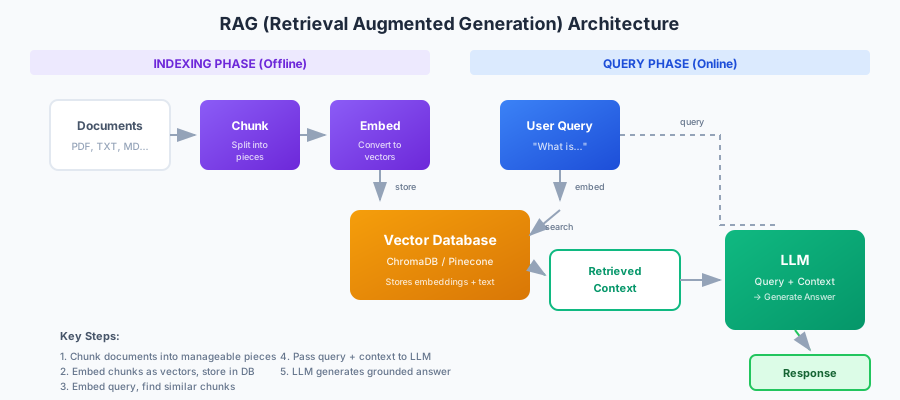
The Two Phases
RAG systems operate in two distinct phases:
Indexing Phase (Offline)
Before users can query, you must prepare your knowledge base:
- Load documents - Read PDFs, web pages, databases, etc.
- Chunk - Split documents into smaller pieces (typically 200-1000 characters)
- Embed - Convert each chunk to a vector using an embedding model
- Store - Save vectors and text in a vector database
This is done once per document (and again when documents update).
Query Phase (Online)
When a user asks a question:
- Embed the query - Convert the question to a vector
- Search - Find the most similar document chunks
- Augment - Add retrieved chunks to the LLM prompt
- Generate - LLM produces an answer using the context
The key insight: embedding models are trained to produce similar vectors for semantically similar text. "What is machine learning?" and "ML is a type of AI that learns from data" will have similar vectors despite using different words.
Core Concepts
Chunking Strategy
How you split documents dramatically affects quality. Consider this trade-off:
| Chunk Size | Pros | Cons |
|---|---|---|
| Small (100-300 chars) | Precise retrieval | May lose context |
| Medium (300-800 chars) | Balanced | Good default |
| Large (800-1500 chars) | More context | Less precise |
The Overlap Principle
Adjacent chunks should overlap by 10-20% to avoid cutting ideas in half. If you split "Machine learning uses algorithms. These algorithms learn from data." at the period, one chunk has "algorithms" without explanation, the other has "algorithms" without knowing what it refers to.
Chunking Strategies
Fixed-size with overlap: Simple, predictable. Split every N characters with M overlap.
Recursive splitting: Try splitting by paragraphs first, then sentences, then characters. Preserves natural boundaries.
Semantic chunking: Use embedding similarity to detect topic changes. More complex but preserves meaning.
For most use cases: Start with recursive splitting at 500 characters with 50 character overlap.
Embedding Models
The embedding model converts text to vectors. Quality varies significantly:
| Model | Dimensions | Quality | Speed |
|---|---|---|---|
| OpenAI text-embedding-3-small | 1536 | Excellent | Fast |
| OpenAI text-embedding-3-large | 3072 | Best | Medium |
| all-MiniLM-L6-v2 | 384 | Good | Very Fast |
| nomic-embed-text | 768 | Very Good | Fast |
| BGE-large-en | 1024 | Excellent | Medium |
Key principle: Use the same embedding model for indexing and querying. Different models produce incompatible vectors.
Local vs API:
- OpenAI embeddings are convenient but require API calls
- Local models (via sentence-transformers or Ollama) work offline with no per-call cost
Vector Databases
Once you have vectors, you need somewhere to store and search them:
| Database | Type | Best For |
|---|---|---|
| ChromaDB | Embedded | Prototyping, single-machine |
| Pinecone | Cloud | Production, scalability |
| Weaviate | Self-hosted | Production with control |
| pgvector | PostgreSQL extension | Existing Postgres infra |
| Qdrant | Self-hosted | High performance |
For learning and prototyping, ChromaDB is perfect—it runs in-memory or on disk with no setup.
Retrieval Techniques
Basic Similarity Search
Find the k most similar chunks to the query. Simple and effective for many use cases.
Similarity metrics:
- Cosine similarity: Most common; measures angle between vectors
- Euclidean distance: Actual distance in vector space
- Dot product: Fast but assumes normalized vectors
Hybrid Search
Combine semantic search with keyword matching:
BM25 (keyword): Great for exact matches like names, codes, or technical terms Vector (semantic): Great for conceptual similarity
Hybrid search with alpha=0.5 (50% each) often outperforms either alone.
Re-ranking
After initial retrieval, re-rank results with a more powerful model:
- Retrieve top 20 with fast vector search
- Re-rank to top 5 with cross-encoder model
Cross-encoders are more accurate but slower—they process query and document together rather than independently.
Building a Basic RAG System
Here's a minimal but complete RAG implementation. This example demonstrates the core pattern without the complexity of production frameworks. You can build a working RAG system in under 50 lines of code.
The implementation has two main functions:
index_document: Splits text into overlapping chunks, embeds each chunk, and stores both the embedding and original text in the vector databaseask: Embeds the question, retrieves similar chunks, builds a context string, and prompts the LLM to answer based on that context
import chromadb
from sentence_transformers import SentenceTransformer
from openai import OpenAI

# Initialize components
embed_model = SentenceTransformer('all-MiniLM-L6-v2')
chroma = chromadb.Client()
collection = chroma.create_collection("docs")
llm_client = OpenAI()

# Index documents
def index_document(text: str, source: str):
    # Simple chunking
    chunks = [text[i:i+500] for i in range(0, len(text), 450)]

    for i, chunk in enumerate(chunks):
        embedding = embed_model.encode(chunk).tolist()
        collection.add(
            ids=[f"{source}_{i}"],
            embeddings=[embedding],
            documents=[chunk],
            metadatas=[{"source": source}]
        )

# Query the system
def ask(question: str) -> str:
    # Embed question and find similar chunks
    q_embedding = embed_model.encode(question).tolist()
    results = collection.query(query_embeddings=[q_embedding], n_results=3)

    # Build context from retrieved chunks
    context = "\n\n".join(results['documents'][0])

    # Generate answer
    response = llm_client.chat.completions.create(
        model="gpt-4o-mini",
        messages=[
            {"role": "system", "content": f"Answer based on this context:\n{context}"},
            {"role": "user", "content": question}
        ]
    )
    return response.choices[0].message.content

# Usage
index_document("Python was created by Guido van Rossum in 1991...", "python_history.txt")
print(ask("Who created Python?"))
This is ~30 lines of actual logic. The complexity comes from handling edge cases, scaling, and improving quality.
Why RAG Fails (And How to Fix It)
Understanding failure modes is crucial for building reliable systems.
Problem 1: Wrong Chunks Retrieved
Symptoms: The answer ignores relevant information that exists in your documents.
Causes:
- Query and document use different terminology
- Chunk size doesn't match query granularity
- Important context spans multiple chunks
Solutions:
- Try hybrid search (BM25 + vector)
- Adjust chunk size and overlap
- Use query expansion (generate alternative phrasings)
- Add metadata filtering when applicable
Problem 2: LLM Ignores Context
Symptoms: The model gives general answers instead of using retrieved content.
Causes:
- Prompt doesn't emphasize using the context
- Too much context dilutes important information
- Context placed too far from the question
Solutions:
- Explicit instructions: "Only use the provided context"
- Reduce to fewer, more relevant chunks
- Put context immediately before the question
- Use a stronger LLM
Problem 3: Hallucination Despite Context
Symptoms: The answer contains information not in the retrieved chunks.
Causes:
- Retrieved chunks don't actually answer the question
- Model's training data "fills in" perceived gaps
- Ambiguous or contradictory context
Solutions:
- Add "If the answer isn't in the context, say so"
- Increase retrieval count to improve coverage
- Use confidence scoring and filtering
- Enable source citations
Problem 4: Poor Chunking
Symptoms: Retrieved chunks are incomplete or lack necessary context.
Causes:
- Sentences cut mid-thought
- Related information scattered across chunks
- No overlap between chunks
Solutions:
- Add 10-20% overlap
- Use sentence-aware splitting
- Try semantic chunking
- Include document metadata with each chunk
Evaluation Methodology
How do you know if your RAG system is working well?
Key Metrics
Retrieval Quality:
- Recall@K: What percentage of relevant documents are in the top K?
- MRR (Mean Reciprocal Rank): How high is the first relevant result?
- NDCG: Accounts for position of all relevant results
Generation Quality:
- Faithfulness: Is the answer supported by the context?
- Relevance: Does it actually answer the question?
- Coherence: Is it well-structured and clear?
Using RAGAS
RAGAS is a framework specifically for RAG evaluation. It uses LLMs as judges to score your system across multiple dimensions: whether the answer is faithful to the retrieved context, whether it's relevant to the question, and whether the retrieved context is precise. This automated evaluation helps you iterate faster than manual review.
from ragas import evaluate
from ragas.metrics import faithfulness, answer_relevancy, context_precision

result = evaluate(
    dataset={
        "question": ["What is machine learning?"],
        "answer": ["Machine learning is..."],
        "contexts": [["ML is a type of AI..."]],
    },
    metrics=[faithfulness, answer_relevancy, context_precision]
)
Building Test Sets
For reliable evaluation, create:
- Query set: Representative questions users will ask
- Ground truth: Expected answers or relevant document IDs
- Edge cases: Questions with no answer, ambiguous queries
Test against your set whenever you change chunking, embeddings, or prompts.
Advanced Techniques
Query Expansion
Generate multiple versions of the query to improve recall:
Original: "How do I reset my password?" Expanded: ["password reset", "forgot password", "change login credentials"]
Search all variations and combine results.
Contextual Compression
After retrieval, extract only the relevant sentences from each chunk. Reduces noise and fits more information in context.
Conversation Memory
For follow-up questions, reformulate with context:
User: "What is machine learning?" Assistant: "Machine learning is..." User: "How is it different from deep learning?"
Before searching, rewrite as: "How is machine learning different from deep learning?"
Metadata Filtering
Combine vector search with structured filters:
- Only search documents from a specific date range
- Filter by department or document type
- Restrict to user's access permissions
Production Considerations
Caching
Cache embeddings for repeated queries. Most RAG traffic follows power-law distribution—a small number of queries account for most volume.
Streaming
Stream LLM responses for better user experience. The first token matters more than total latency.
Monitoring
Track:
- Retrieval latency and result counts
- LLM generation time and token usage
- User satisfaction signals (thumbs up/down)
- Queries with no good results
Document Updates
When documents change:
- Re-chunk and re-embed updated documents
- Delete old chunks before adding new
- Consider versioning for audit trails
Conclusion
RAG transforms LLMs from general-purpose text generators into knowledgeable assistants grounded in your specific content. The core architecture is simple, but the details matter:
Start simple:
- Use recursive chunking with overlap
- Use a good embedding model
- Retrieve 3-5 chunks
- Clear prompts that emphasize using context
Iterate based on failures:
- Test with real queries
- Identify failure patterns
- Apply targeted fixes (hybrid search, reranking, better chunking)
- Measure improvement
The gap between a working prototype and a production system lies in handling edge cases, evaluation, and continuous improvement based on user feedback.
References
- Lewis, P., et al. (2020). "Retrieval-Augmented Generation for Knowledge-Intensive NLP Tasks". NeurIPS 2020.
- Gao, Y., et al. (2024). "Retrieval-Augmented Generation for Large Language Models: A Survey". arXiv preprint.
- RAGAS Documentation - Evaluation framework for RAG systems.
- ChromaDB - Embedded vector database.
- LangChain RAG Tutorial - Framework-based approach.