- Published on
Structured Outputs: Getting Reliable JSON from LLMs
- Authors

- Name
- Jared Chung
Introduction
Free-form text is great for chat, but production applications need structured data. You need JSON for APIs, objects for code, and consistent formats for downstream processing.
The challenge: LLMs are trained to generate natural language, not valid JSON. Getting reliable structured outputs requires the right techniques.
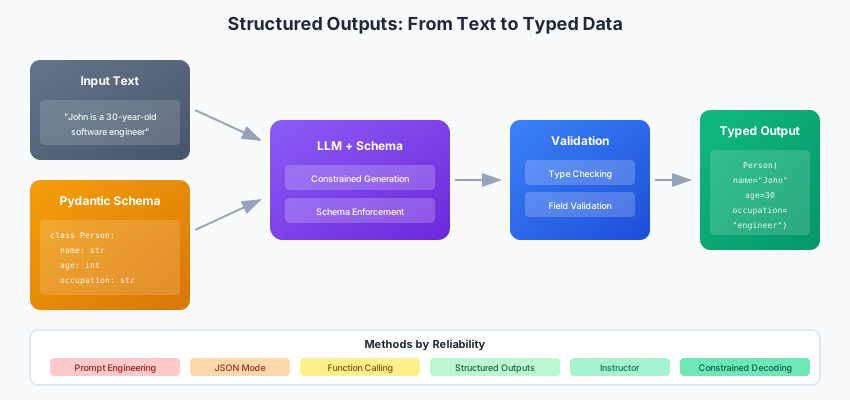
The Structured Output Spectrum
From least to most reliable:
| Method | Reliability | Flexibility | Provider Support |
|---|---|---|---|
| Prompt engineering | Low | High | All |
| JSON mode | Medium | Medium | Most |
| Function calling | High | Medium | Most |
| Structured outputs | Very High | Medium | OpenAI, Anthropic |
| Constrained decoding | Highest | Low | Outlines, LMQL |
Method 1: Prompt Engineering
The simplest approach sometimes works, but relies entirely on the model following instructions. Without any enforcement mechanism, you're asking the model to produce valid JSON purely through prompting. This works often enough for prototyping but fails unpredictably in production.
def extract_with_prompt(text: str) -> dict:
    prompt = f"""Extract the following information from the text as JSON:
    - name (string)
    - age (integer)
    - occupation (string)

    Text: {text}

    Return ONLY valid JSON, no other text:"""

    response = llm.generate(prompt)

    # Hope for the best
    return json.loads(response)
Problems:
- Model might add markdown code blocks
- Extra explanatory text
- Invalid JSON syntax
- Missing or extra fields
Method 2: JSON Mode
Most providers support a JSON mode:
OpenAI
from openai import OpenAI

client = OpenAI()

response = client.chat.completions.create(
    model="gpt-4o",
    response_format={"type": "json_object"},
    messages=[
        {"role": "system", "content": "Extract data as JSON with fields: name, age, occupation"},
        {"role": "user", "content": "John is a 30-year-old software engineer."}
    ]
)

data = json.loads(response.choices[0].message.content)
# {"name": "John", "age": 30, "occupation": "software engineer"}
Anthropic
from anthropic import Anthropic

client = Anthropic()

response = client.messages.create(
    model="claude-sonnet-4-20250514",
    max_tokens=1024,
    messages=[
        {"role": "user", "content": """Extract as JSON: {"name": str, "age": int, "occupation": str}

        Text: John is a 30-year-old software engineer.

        JSON:"""}
    ]
)

data = json.loads(response.content[0].text)
Better, but:
- Schema not enforced
- Can still get wrong types
- Might miss required fields
Method 3: Function Calling / Tool Use
Define your schema as a function. Function calling was designed for letting LLMs invoke external tools, but it's equally useful for structured extraction. The model is trained to produce valid JSON matching your function schema, making it more reliable than pure prompting.
The tool_choice parameter forces the model to call your function, ensuring structured output on every request. Without it, the model might respond with plain text instead.
OpenAI Function Calling
from openai import OpenAI
import json

client = OpenAI()

tools = [{
    "type": "function",
    "function": {
        "name": "extract_person",
        "description": "Extract person information from text",
        "parameters": {
            "type": "object",
            "properties": {
                "name": {"type": "string", "description": "Person's full name"},
                "age": {"type": "integer", "description": "Person's age in years"},
                "occupation": {"type": "string", "description": "Person's job title"}
            },
            "required": ["name", "age", "occupation"]
        }
    }
}]

response = client.chat.completions.create(
    model="gpt-4o",
    messages=[{"role": "user", "content": "John is a 30-year-old software engineer."}],
    tools=tools,
    tool_choice={"type": "function", "function": {"name": "extract_person"}}
)

# Parse the function call
tool_call = response.choices[0].message.tool_calls[0]
data = json.loads(tool_call.function.arguments)
Anthropic Tool Use
from anthropic import Anthropic

client = Anthropic()

tools = [{
    "name": "extract_person",
    "description": "Extract person information from text",
    "input_schema": {
        "type": "object",
        "properties": {
            "name": {"type": "string"},
            "age": {"type": "integer"},
            "occupation": {"type": "string"}
        },
        "required": ["name", "age", "occupation"]
    }
}]

response = client.messages.create(
    model="claude-sonnet-4-20250514",
    max_tokens=1024,
    tools=tools,
    messages=[{"role": "user", "content": "John is a 30-year-old software engineer."}]
)

# Find tool use block
for block in response.content:
    if block.type == "tool_use":
        data = block.input
        break
Method 4: Native Structured Outputs
The most reliable option when available.
OpenAI Structured Outputs
from openai import OpenAI
from pydantic import BaseModel

client = OpenAI()

class Person(BaseModel):
    name: str
    age: int
    occupation: str

response = client.beta.chat.completions.parse(
    model="gpt-4o-2024-08-06",
    messages=[{"role": "user", "content": "John is a 30-year-old software engineer."}],
    response_format=Person
)

person = response.choices[0].message.parsed
# Person(name='John', age=30, occupation='software engineer')
Complex Nested Schemas
from pydantic import BaseModel, Field
from typing import List, Optional
from enum import Enum

class Priority(str, Enum):
    LOW = "low"
    MEDIUM = "medium"
    HIGH = "high"

class Task(BaseModel):
    title: str
    description: str
    priority: Priority
    estimated_hours: float = Field(ge=0)

class Project(BaseModel):
    name: str
    tasks: List[Task]
    deadline: Optional[str] = None

response = client.beta.chat.completions.parse(
    model="gpt-4o",
    messages=[{
        "role": "user",
        "content": "Create a project plan for building a REST API with 3 tasks"
    }],
    response_format=Project
)

project = response.choices[0].message.parsed
for task in project.tasks:
    print(f"- {task.title} ({task.priority.value}): {task.estimated_hours}h")
Method 5: Instructor Library
Works with multiple providers through a unified interface. Instructor patches the client to add a response_model parameter that accepts Pydantic models. It handles the function calling setup, JSON parsing, and validation automatically—including retrying when the output doesn't match the schema.
This is often the best option for production use: you get the reliability of function calling with the ergonomics of working directly with Pydantic models.
import instructor
from openai import OpenAI
from pydantic import BaseModel

# Patch the client
client = instructor.from_openai(OpenAI())

class Person(BaseModel):
    name: str
    age: int
    occupation: str

# Automatically handles parsing and retries
person = client.chat.completions.create(
    model="gpt-4o",
    messages=[{"role": "user", "content": "John is a 30-year-old engineer."}],
    response_model=Person,
)

print(person.name)  # John
With Anthropic
import instructor
from anthropic import Anthropic

client = instructor.from_anthropic(Anthropic())

person = client.messages.create(
    model="claude-sonnet-4-20250514",
    max_tokens=1024,
    messages=[{"role": "user", "content": "John is a 30-year-old engineer."}],
    response_model=Person,
)
Retries and Validation
from pydantic import BaseModel, field_validator

class Email(BaseModel):
    subject: str
    body: str
    recipients: List[str]

    @field_validator("recipients")
    @classmethod
    def validate_emails(cls, v):
        for email in v:
            if "@" not in email:
                raise ValueError(f"Invalid email: {email}")
        return v

# Instructor automatically retries if validation fails
email = client.chat.completions.create(
    model="gpt-4o",
    messages=[{"role": "user", "content": "Draft an email to john@example.com about the meeting"}],
    response_model=Email,
    max_retries=3,  # Retry if validation fails
)
Method 6: Constrained Decoding
For maximum reliability with local models, constrained decoding guarantees valid output by restricting the tokens the model can generate at each step. Unlike prompting-based approaches that hope for the best, constrained decoding makes invalid output mathematically impossible.
This is particularly useful for local models that may be less reliable at following format instructions than larger API models.
Outlines
import outlines

model = outlines.models.transformers("mistralai/Mistral-7B-v0.1")

# Define schema
schema = {
    "type": "object",
    "properties": {
        "name": {"type": "string"},
        "age": {"type": "integer"},
        "occupation": {"type": "string"}
    },
    "required": ["name", "age", "occupation"]
}

generator = outlines.generate.json(model, schema)

result = generator("Extract from: John is a 30-year-old engineer")
# Guaranteed valid JSON matching schema
With Pydantic
from pydantic import BaseModel
import outlines

class Person(BaseModel):
    name: str
    age: int
    occupation: str

generator = outlines.generate.json(model, Person)
person = generator("John is a 30-year-old engineer")
Handling Edge Cases
Missing Information
from pydantic import BaseModel
from typing import Optional

class Person(BaseModel):
    name: str
    age: Optional[int] = None  # Might not be mentioned
    occupation: Optional[str] = None

# Add instructions
prompt = """Extract person info. Use null for missing fields.
Text: John works in tech.
"""

# Result: Person(name='John', age=None, occupation='tech')
Ambiguous Data
from pydantic import BaseModel, Field
from typing import List

class Extraction(BaseModel):
    value: str
    confidence: float = Field(ge=0, le=1)
    alternatives: List[str] = []

class Person(BaseModel):
    name: Extraction
    age: Extraction

# Prompt for uncertainty
prompt = """Extract person info with confidence scores.
If uncertain, provide alternatives.
Text: Jon or John is around 30.
"""

# Result shows uncertainty
# Person(
#   name=Extraction(value='John', confidence=0.6, alternatives=['Jon']),
#   age=Extraction(value='30', confidence=0.8, alternatives=['29', '31'])
# )
Lists and Multiple Entities
class Person(BaseModel):
    name: str
    age: Optional[int]

class ExtractionResult(BaseModel):
    people: List[Person]

prompt = """Extract all people mentioned.
Text: John (30) and Mary work together. Bob joined recently.
"""

# Result: ExtractionResult(people=[
#   Person(name='John', age=30),
#   Person(name='Mary', age=None),
#   Person(name='Bob', age=None)
# ])
Real-World Patterns
Entity Extraction Pipeline
from pydantic import BaseModel
from typing import List, Optional
import instructor
from openai import OpenAI

client = instructor.from_openai(OpenAI())

class Entity(BaseModel):
    text: str
    type: str  # PERSON, ORG, LOCATION, etc.
    start: int
    end: int

class ExtractionResult(BaseModel):
    entities: List[Entity]
    raw_text: str

def extract_entities(text: str) -> ExtractionResult:
    return client.chat.completions.create(
        model="gpt-4o",
        messages=[
            {"role": "system", "content": """Extract named entities.
            Include character positions for each entity.
            Types: PERSON, ORG, LOCATION, DATE, MONEY"""},
            {"role": "user", "content": text}
        ],
        response_model=ExtractionResult,
    )

result = extract_entities("Apple CEO Tim Cook announced...")
for entity in result.entities:
    print(f"{entity.type}: {entity.text} [{entity.start}:{entity.end}]")
Classification with Reasoning
from enum import Enum

class Sentiment(str, Enum):
    POSITIVE = "positive"
    NEGATIVE = "negative"
    NEUTRAL = "neutral"

class Classification(BaseModel):
    sentiment: Sentiment
    confidence: float
    reasoning: str

def classify_sentiment(text: str) -> Classification:
    return client.chat.completions.create(
        model="gpt-4o",
        messages=[
            {"role": "system", "content": "Classify sentiment and explain your reasoning."},
            {"role": "user", "content": text}
        ],
        response_model=Classification,
    )

result = classify_sentiment("The product is okay but shipping was slow")
print(f"{result.sentiment.value} ({result.confidence:.0%}): {result.reasoning}")
Data Transformation
class RawRecord(BaseModel):
    text: str

class NormalizedRecord(BaseModel):
    name: str
    phone: str  # Normalized format: +1-XXX-XXX-XXXX
    email: str  # Lowercase

def normalize_contact(raw: str) -> NormalizedRecord:
    return client.chat.completions.create(
        model="gpt-4o",
        messages=[
            {"role": "system", "content": """Normalize contact information.
            Phone: +1-XXX-XXX-XXXX format
            Email: lowercase
            Name: Title Case"""},
            {"role": "user", "content": raw}
        ],
        response_model=NormalizedRecord,
    )

result = normalize_contact("JOHN DOE, john.doe@GMAIL.COM, (555) 123-4567")
# NormalizedRecord(
#   name='John Doe',
#   phone='+1-555-123-4567',
#   email='john.doe@gmail.com'
# )
Best Practices
- Use Pydantic for schemas: Type hints and validation built-in
- Make fields Optional when appropriate: Don't force hallucination
- Add Field descriptions: Helps the model understand intent
- Implement retries: Structured outputs can still fail
- Validate outputs: Don't trust, verify
- Log failures: Track which schemas cause problems
- Start simple: Add complexity only when needed
Conclusion
Structured outputs have evolved from hacky prompt engineering to first-class features. Use native structured outputs when available, Instructor for cross-provider compatibility, and constrained decoding for maximum reliability.
The key is matching your reliability requirements to the right technique and always validating the output before trusting it.