- Published on
GraphRAG: When Knowledge Graphs Meet Retrieval
- Authors

- Name
- Jared Chung
Introduction
Vector RAG works well for simple queries: "What is machine learning?" retrieves chunks about ML, and the LLM generates a grounded answer. But ask "What medications interact with drugs prescribed to patients over 60 with diabetes?" and vector similarity falls short. This query requires traversing relationships between patients, conditions, prescriptions, and drug interactions that don't exist as contiguous text.
GraphRAG combines knowledge graphs with retrieval to handle exactly these cases. Instead of only matching semantically similar text, it extracts entities and relationships from documents, builds a graph structure, and uses that structure to answer queries that require following connections.
This post covers the methodology behind graph-based RAG when to use it, how Microsoft's GraphRAG works, practical Neo4j integration, and hybrid patterns that combine graph and vector retrieval.
Why Graphs for RAG?
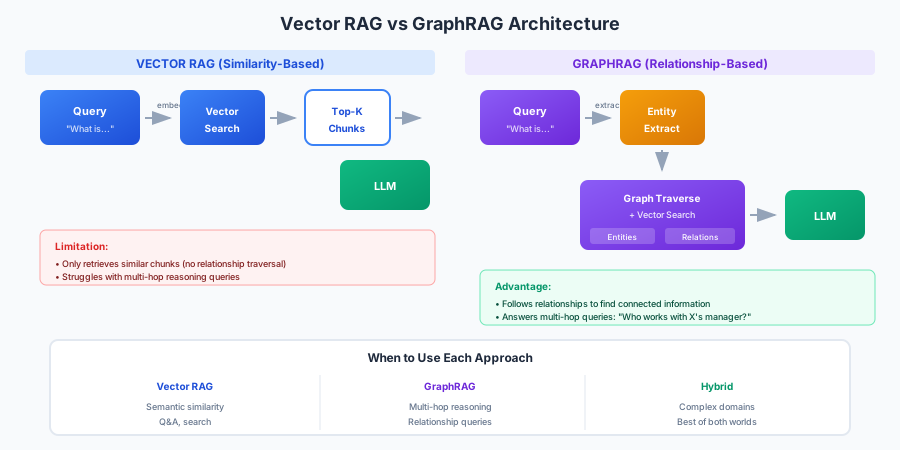
Standard RAG retrieves text chunks based on semantic similarity. This works when the answer exists in a single chunk or a few nearby chunks. But many real-world queries require reasoning across relationships:
| Query Type | Vector RAG | GraphRAG |
|---|---|---|
| "What is attention in transformers?" | Retrieves relevant chunks | Also works |
| "Who reports to the CEO?" | Misses org chart relationships | Follows REPORTS_TO edges |
| "What papers cite work by authors at Stanford?" | Random chunk retrieval | Traverses AUTHORED, AFFILIATED_WITH, CITES |
| "Find all products affected by supplier delays" | Can't trace supply chain | Walks SUPPLIES, CONTAINS relationships |
The fundamental difference: vector search finds similar content, graph search finds connected content. When your query implies relationships, graphs add value.
Understanding Knowledge Graphs
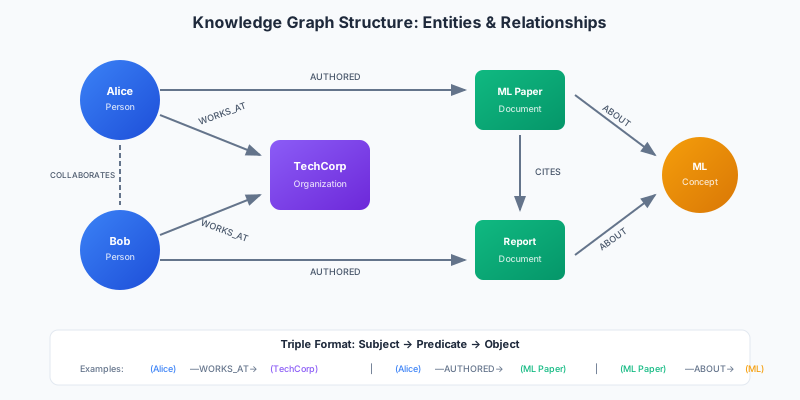
A knowledge graph represents information as a network of entities (nodes) connected by relationships (edges). Each relationship forms a triple: Subject → Predicate → Object.
Triple Structure
Every fact becomes a triple:
(Alice) -[WORKS_AT]→ (TechCorp)(Alice) -[AUTHORED]→ (ML Paper)(ML Paper) -[CITES]→ (Previous Work)(ML Paper) -[ABOUT]→ (Machine Learning)
This structure enables queries like "Find all papers written by people who work at TechCorp" by traversing: (:Organization {name: 'TechCorp'}) ←[:WORKS_AT]- (:Person) -[:AUTHORED]→ (:Paper).
Why This Matters for RAG
Knowledge graphs provide:
- Explicit relationships: "works at," "reports to," "cites" are stored directly, not inferred
- Multi-hop traversal: Follow chains of relationships to gather connected context
- Structured + unstructured: Combine graph relationships with text embeddings
- Explainability: Show the path used to reach an answer
Building a Simple Graph
Here's a conceptual example using NetworkX to understand graph structure:
import networkx as nx

# Create a directed graph
G = nx.DiGraph()

# Add entities (nodes) with types
G.add_node("Alice", type="Person", role="Engineer")
G.add_node("Bob", type="Person", role="Manager")
G.add_node("TechCorp", type="Organization", industry="Technology")
G.add_node("ML Paper", type="Document", year=2024)

# Add relationships (edges)
G.add_edge("Alice", "TechCorp", relation="WORKS_AT")
G.add_edge("Bob", "TechCorp", relation="WORKS_AT")
G.add_edge("Alice", "Bob", relation="REPORTS_TO")
G.add_edge("Alice", "ML Paper", relation="AUTHORED")

# Query: Who does Alice report to?
for _, target, data in G.out_edges("Alice", data=True):
    if data["relation"] == "REPORTS_TO":
        print(f"Alice reports to {target}")  # Bob

# Query: Find all authors at TechCorp
techcorp_employees = [n for n, t, d in G.in_edges("TechCorp", data=True)
                      if d["relation"] == "WORKS_AT"]
for employee in techcorp_employees:
    papers = [t for _, t, d in G.out_edges(employee, data=True)
              if d["relation"] == "AUTHORED"]
    if papers:
        print(f"{employee} authored: {papers}")
This is the foundation. Production GraphRAG systems use proper graph databases and automate entity extraction.
When Graph RAG Beats Vector RAG
Not every RAG system needs graphs. Here's a decision framework:
Use Vector RAG When
- Queries are semantically similar to document content
- Answers exist in localized text chunks
- You need fast prototyping with minimal infrastructure
- Documents are unstructured prose without clear entities
Use GraphRAG When
- Queries require following relationships (multi-hop reasoning)
- Domain has clear entity types (people, organizations, products)
- Users ask "who," "which," and "how connected" questions
- You need to explain why something was retrieved
- Documents describe interconnected systems
Decision Matrix
| Factor | Vector | Graph | Hybrid |
|---|---|---|---|
| Query complexity | Single-hop | Multi-hop | Variable |
| Entity clarity | Vague | Well-defined | Mixed |
| Relationship importance | Low | High | Medium |
| Setup complexity | Low | Medium-High | High |
| Latency requirements | Sub-second | Can be higher | Depends |
Real-World Use Cases
Drug Discovery: Graph connecting genes, proteins, diseases, and compounds. Query: "Find compounds that target proteins expressed in lung cancer cells."
Fraud Detection: Graph of accounts, transactions, devices, and addresses. Query: "Show accounts connected to flagged transactions within 2 hops."
Customer 360: Graph linking customers, purchases, support tickets, and products. Query: "Find customers who bought Product X and contacted support about compatibility."
Research Literature: Graph of papers, authors, institutions, and citations. Query: "Trace the research lineage of attention mechanisms."
Microsoft GraphRAG Deep Dive
Microsoft's GraphRAG takes a specific approach: it extracts entities and relationships from documents, clusters them into communities, and generates summaries at each level. This enables both local queries (specific facts) and global queries (summarizing themes across the corpus).
Architecture Overview
The GraphRAG pipeline:
- Document Processing: Split documents into text chunks
- Entity Extraction: LLM extracts entities and relationships from each chunk
- Graph Construction: Build a graph from extracted triples
- Community Detection: Cluster related entities using Leiden algorithm
- Community Summarization: Generate hierarchical summaries of each community
- Indexing: Create search indexes for both local and global queries
Setup and Configuration
Install GraphRAG and initialize a project:
pip install graphrag

# Initialize project structure
graphrag init --root ./my_project
This creates:
my_project/
├── settings.yaml      # Configuration
├── prompts/           # Customizable extraction prompts
└── input/             # Place your documents here
Configure settings.yaml:
llm:
  api_type: openai
  model: gpt-4o
  api_key: ${OPENAI_API_KEY}

embeddings:
  api_type: openai
  model: text-embedding-3-small

chunks:
  size: 1200
  overlap: 100

entity_extraction:
  max_gleanings: 1
  prompt: 'prompts/entity_extraction.txt'

community_reports:
  max_length: 2000

claim_extraction:
  enabled: false
Indexing Documents
Place your documents in input/ and run indexing:
graphrag index --root ./my_project
This runs the full pipeline:
- Chunks documents
- Extracts entities and relationships (LLM calls)
- Builds the graph
- Detects communities
- Generates community summaries
The output goes to output/ with parquet files containing entities, relationships, communities, and summaries.
Querying: Local vs Global
GraphRAG supports two query modes:
Local Search: For specific questions about entities. Retrieves relevant entities, their relationships, and associated text chunks.
graphrag query \
  --root ./my_project \
  --method local \
  --query "What projects did Alice work on?"
Global Search: For questions about the entire corpus. Uses community summaries to answer thematic questions.
graphrag query \
  --root ./my_project \
  --method global \
  --query "What are the main research themes in this collection?"
Python API
For programmatic access:
import asyncio
from graphrag.query.indexer_adapters import (
    read_indexer_entities,
    read_indexer_relationships,
    read_indexer_reports,
)
from graphrag.query.llm.oai.chat_openai import ChatOpenAI
from graphrag.query.structured_search.local_search.search import LocalSearch

# Load indexed data
entities = read_indexer_entities("./output/entities.parquet")
relationships = read_indexer_relationships("./output/relationships.parquet")

# Initialize search
llm = ChatOpenAI(model="gpt-4o")
local_search = LocalSearch(
    llm=llm,
    entities=entities,
    relationships=relationships,
    # ... additional config
)

# Query
result = asyncio.run(local_search.asearch("What did Alice contribute to the ML project?"))
print(result.response)
Cost Considerations
GraphRAG indexing is LLM-intensive:
- Entity extraction requires LLM calls for each chunk
- Community summarization adds more calls
- Larger corpora = significantly higher indexing costs
| Corpus Size | Approximate Index Cost (GPT-4o) |
|---|---|
| 10 documents | $1-5 |
| 100 documents | $10-50 |
| 1000 documents | $100-500+ |
Queries are cheaper (single LLM call), but indexing costs add up. Consider:
- Using cheaper models for extraction (gpt-4o-mini)
- Caching extracted entities
- Incremental updates rather than full re-indexing
Tuning Parameters
| Parameter | Effect | Recommendation |
|---|---|---|
chunk_size | Larger = more context per extraction | 1000-1500 for dense content |
max_gleanings | Multiple passes for entity extraction | 1 for speed, 2+ for completeness |
community_level | Which hierarchy level for global queries | Experiment based on corpus |
top_k_entities | Entities returned in local search | 10-20 for most queries |
Neo4j + LangChain Integration
Neo4j is a production-grade graph database with native graph storage, the Cypher query language, and vector search capabilities. Combined with LangChain, it enables powerful GraphRAG pipelines.
Docker Setup
Start Neo4j with vector search enabled:
docker run -d \
  --name neo4j-graphrag \
  -p 7474:7474 -p 7687:7687 \
  -e NEO4J_AUTH=neo4j/password123 \
  -e NEO4J_PLUGINS='["apoc"]' \
  neo4j:5.15
Access the browser at http://localhost:7474.
Schema Design
Create constraints and indexes for your entity types:
// Unique constraints
CREATE CONSTRAINT person_name IF NOT EXISTS FOR (p:Person) REQUIRE p.name IS UNIQUE;
CREATE CONSTRAINT org_name IF NOT EXISTS FOR (o:Organization) REQUIRE o.name IS UNIQUE;
CREATE CONSTRAINT doc_id IF NOT EXISTS FOR (d:Document) REQUIRE d.id IS UNIQUE;

// Vector index for semantic search
CREATE VECTOR INDEX document_embeddings IF NOT EXISTS
FOR (d:Document) ON (d.embedding)
OPTIONS {indexConfig: {
  `vector.dimensions`: 1536,
  `vector.similarity_function`: 'cosine'
}};

// Full-text index for keyword search
CREATE FULLTEXT INDEX document_content IF NOT EXISTS
FOR (d:Document) ON EACH [d.content];
LangChain Graph Connection
Connect LangChain to Neo4j:
from langchain_community.graphs import Neo4jGraph
from langchain_openai import ChatOpenAI, OpenAIEmbeddings

# Connect to Neo4j
graph = Neo4jGraph(
    url="bolt://localhost:7687",
    username="neo4j",
    password="password123"
)

# View schema
print(graph.schema)
Entity Extraction with LLMGraphTransformer
LangChain can extract entities from documents and populate the graph:
from langchain_experimental.graph_transformers import LLMGraphTransformer
from langchain_core.documents import Document

# Initialize transformer
llm = ChatOpenAI(model="gpt-4o", temperature=0)
transformer = LLMGraphTransformer(llm=llm)

# Sample document
doc = Document(page_content="""
Alice Chen is a senior engineer at TechCorp. She leads the ML team
and authored the company's influential paper on transformer optimization.
Bob Smith, her manager, oversees the entire AI division.
""")

# Extract graph structure
graph_documents = transformer.convert_to_graph_documents([doc])

# View extracted entities and relationships
for graph_doc in graph_documents:
    print("Nodes:", [n.id for n in graph_doc.nodes])
    print("Relationships:", [(r.source.id, r.type, r.target.id) for r in graph_doc.relationships])

# Add to Neo4j
graph.add_graph_documents(graph_documents)
Output:
Nodes: ['Alice Chen', 'TechCorp', 'ML team', 'Bob Smith', 'AI division']
Relationships: [('Alice Chen', 'WORKS_AT', 'TechCorp'),
                ('Alice Chen', 'LEADS', 'ML team'),
                ('Bob Smith', 'MANAGES', 'Alice Chen'),
                ('Bob Smith', 'OVERSEES', 'AI division')]
Natural Language Graph Queries
Use GraphCypherQAChain to convert natural language to Cypher:
from langchain.chains import GraphCypherQAChain

# Create the chain
cypher_chain = GraphCypherQAChain.from_llm(
    llm=ChatOpenAI(model="gpt-4o", temperature=0),
    graph=graph,
    verbose=True,
    allow_dangerous_requests=True  # Required for arbitrary Cypher
)

# Natural language query
response = cypher_chain.invoke({
    "query": "Who does Alice Chen report to?"
})
print(response["result"])
# "Alice Chen reports to Bob Smith."

# The chain generates Cypher like:
# MATCH (a:Person {name: 'Alice Chen'})-[:REPORTS_TO]->(m:Person)
# RETURN m.name
Hybrid Vector + Graph Retrieval
Combine semantic search with graph traversal:
from langchain_community.vectorstores import Neo4jVector
from langchain_openai import OpenAIEmbeddings

# Create vector store backed by Neo4j
vector_store = Neo4jVector.from_existing_graph(
    embedding=OpenAIEmbeddings(),
    url="bolt://localhost:7687",
    username="neo4j",
    password="password123",
    index_name="document_embeddings",
    node_label="Document",
    text_node_properties=["content"],
    embedding_node_property="embedding"
)

# Hybrid retriever: vector search + graph expansion
def hybrid_retrieve(query: str, k: int = 3, expansion_depth: int = 1):
    # Step 1: Vector search for relevant documents
    docs = vector_store.similarity_search(query, k=k)

    # Step 2: For each doc, expand to related entities
    expanded_context = []
    for doc in docs:
        doc_id = doc.metadata.get("id")

        # Cypher query to get connected entities
        cypher = f"""
        MATCH (d:Document {{id: '{doc_id}'}})-[r*1..{expansion_depth}]-(related)
        RETURN related, type(r[0]) as relationship
        LIMIT 10
        """
        related = graph.query(cypher)

        expanded_context.append({
            "document": doc.page_content,
            "related_entities": related
        })

    return expanded_context

# Usage
context = hybrid_retrieve("What ML projects is TechCorp working on?")
Hybrid Search Patterns
The most effective GraphRAG systems combine multiple retrieval strategies. Here are three patterns:
Pattern 1: Vector First, Then Graph Expansion
Start with semantic search, then expand via relationships:
class VectorThenGraphRAG:
    def __init__(self, vector_store, graph, llm):
        self.vector_store = vector_store
        self.graph = graph
        self.llm = llm

    def retrieve(self, query: str) -> str:
        # Vector search
        initial_docs = self.vector_store.similarity_search(query, k=5)

        # Extract entities mentioned in retrieved docs
        entities = self._extract_entities(initial_docs)

        # Graph expansion: find related entities
        expanded = []
        for entity in entities:
            related = self.graph.query(f"""
                MATCH (e {{name: '{entity}'}})-[r]-(related)
                RETURN related.name, type(r) as relation
                LIMIT 5
            """)
            expanded.extend(related)

        # Combine context
        context = self._format_context(initial_docs, expanded)
        return context
Best for: Starting point for most use cases. Works when documents are well-written and entities are extractable.
Pattern 2: Graph First, Then Vector Ranking
Identify relevant entities, then use vectors to rank:
class GraphThenVectorRAG:
    def __init__(self, vector_store, graph, llm):
        self.vector_store = vector_store
        self.graph = graph
        self.llm = llm

    def retrieve(self, query: str) -> str:
        # Extract entities from query
        query_entities = self._extract_entities_from_query(query)

        # Graph traversal to find related documents
        candidate_docs = []
        for entity in query_entities:
            docs = self.graph.query(f"""
                MATCH (e {{name: '{entity}'}})-[*1..2]-(d:Document)
                RETURN d.id, d.content
                LIMIT 20
            """)
            candidate_docs.extend(docs)

        # Vector ranking: score candidates by similarity to query
        ranked = self._rank_by_similarity(query, candidate_docs)

        return ranked[:5]
Best for: When you know the user is asking about specific entities. Org charts, product catalogs, research networks.
Pattern 3: Parallel Retrieval with Fusion
Run both in parallel and combine results:
class HybridGraphRAG:
    def __init__(self, vector_store, graph, llm, reranker):
        self.vector_store = vector_store
        self.graph = graph
        self.llm = llm
        self.reranker = reranker

    def retrieve(self, query: str) -> str:
        # Parallel retrieval
        vector_results = self.vector_store.similarity_search(query, k=10)

        # Entity-based graph retrieval
        entities = self._extract_entities_from_query(query)
        graph_results = self._graph_retrieve(entities)

        # Reciprocal Rank Fusion
        combined = self._rrf_fusion(
            [("vector", vector_results), ("graph", graph_results)]
        )

        # Rerank with relationship context
        final = self._rerank_with_graph_context(query, combined)

        return final[:5]

    def _rrf_fusion(self, result_lists, k=60):
        """Combine rankings using Reciprocal Rank Fusion"""
        scores = {}
        for name, results in result_lists:
            for rank, doc in enumerate(results):
                doc_id = doc.metadata.get("id", hash(doc.page_content))
                if doc_id not in scores:
                    scores[doc_id] = {"doc": doc, "score": 0}
                scores[doc_id]["score"] += 1 / (k + rank + 1)

        ranked = sorted(scores.values(), key=lambda x: x["score"], reverse=True)
        return [item["doc"] for item in ranked]

    def _rerank_with_graph_context(self, query, docs):
        """Add relationship context before reranking"""
        enriched = []
        for doc in docs:
            # Get graph context
            relations = self._get_relations_for_doc(doc)
            enriched_content = f"{doc.page_content}\n\nRelationships: {relations}"
            enriched.append(enriched_content)

        return self.reranker.rerank(query, enriched)
Best for: Complex queries where neither approach alone is sufficient. Production systems with diverse query types.
Pattern Comparison
| Pattern | Latency | Complexity | Best Query Types |
|---|---|---|---|
| Vector → Graph | Medium | Low | General Q&A with entity expansion |
| Graph → Vector | Medium | Medium | Entity-centric queries |
| Parallel + Fusion | Higher | High | Mixed/unknown query types |
Building Production Systems
Entity Extraction Approaches
The quality of your graph depends on entity extraction. Three approaches:
1. LLM Extraction (Highest quality, highest cost)
from langchain_experimental.graph_transformers import LLMGraphTransformer

transformer = LLMGraphTransformer(
    llm=ChatOpenAI(model="gpt-4o"),
    allowed_nodes=["Person", "Organization", "Product", "Location"],
    allowed_relationships=["WORKS_AT", "MANAGES", "PRODUCES", "LOCATED_IN"]
)
2. NER + Rule-Based (Lower cost, requires tuning)
import spacy

nlp = spacy.load("en_core_web_lg")

def extract_entities(text):
    doc = nlp(text)
    entities = [(ent.text, ent.label_) for ent in doc.ents]

    # Rule-based relationship extraction
    relationships = []
    for token in doc:
        if token.dep_ == "nsubj" and token.head.pos_ == "VERB":
            subject = token.text
            verb = token.head.text
            for child in token.head.children:
                if child.dep_ == "dobj":
                    relationships.append((subject, verb.upper(), child.text))

    return entities, relationships
3. Hybrid (Balance of quality and cost)
def hybrid_extract(text, llm, ner_model):
    # Fast NER pass
    entities, _ = ner_model.extract(text)

    # If high-value entities found, use LLM for relationships
    if any(e[1] in ["ORG", "PERSON"] for e in entities):
        graph_docs = llm_transformer.convert_to_graph_documents([Document(page_content=text)])
        return graph_docs

    # Otherwise, skip expensive extraction
    return None
Incremental Updates
For production systems, avoid full re-indexing:
def incremental_update(new_document, graph, transformer):
    # Extract from new document
    graph_doc = transformer.convert_to_graph_documents([new_document])[0]

    # Check for existing entities
    for node in graph_doc.nodes:
        existing = graph.query(f"""
            MATCH (n:{node.type} {{name: '{node.id}'}})
            RETURN n
        """)

        if existing:
            # Update existing node
            graph.query(f"""
                MATCH (n:{node.type} {{name: '{node.id}'}})
                SET n += $properties
            """, {"properties": node.properties})
        else:
            # Create new node
            graph.query(f"""
                CREATE (n:{node.type} {{name: '{node.id}'}})
                SET n += $properties
            """, {"properties": node.properties})

    # Add relationships
    for rel in graph_doc.relationships:
        graph.query(f"""
            MATCH (a {{name: '{rel.source.id}'}}), (b {{name: '{rel.target.id}'}})
            MERGE (a)-[r:{rel.type}]->(b)
        """)
Monitoring and Debugging
Track key metrics:
import time
from dataclasses import dataclass

@dataclass
class QueryMetrics:
    query: str
    vector_latency_ms: float
    graph_latency_ms: float
    entities_found: int
    relationships_traversed: int
    total_context_tokens: int

def monitored_retrieve(query: str, retriever) -> tuple:
    metrics = QueryMetrics(query=query, ...)

    # Time vector search
    start = time.time()
    vector_results = retriever.vector_search(query)
    metrics.vector_latency_ms = (time.time() - start) * 1000

    # Time graph traversal
    start = time.time()
    graph_results = retriever.graph_expand(vector_results)
    metrics.graph_latency_ms = (time.time() - start) * 1000

    metrics.entities_found = len(graph_results.entities)
    metrics.relationships_traversed = len(graph_results.relationships)

    # Log for analysis
    log_metrics(metrics)

    return graph_results, metrics
Evaluation
GraphRAG-Specific Metrics
Beyond standard RAG metrics, evaluate:
Graph Coverage: What percentage of relevant entities were retrieved?
def graph_coverage(retrieved_entities, ground_truth_entities):
    retrieved_set = set(e["name"] for e in retrieved_entities)
    truth_set = set(ground_truth_entities)
    return len(retrieved_set & truth_set) / len(truth_set)
Relationship Accuracy: Are the right relationships being traversed?
def relationship_accuracy(retrieved_paths, ground_truth_paths):
    correct = sum(1 for p in retrieved_paths if p in ground_truth_paths)
    return correct / len(ground_truth_paths)
Multi-hop Success Rate: For queries requiring N hops, how often do we succeed?
def multihop_success(test_cases, retriever):
    results = {"1_hop": [], "2_hop": [], "3_hop": []}

    for case in test_cases:
        retrieved = retriever.retrieve(case["query"])
        success = case["answer"] in retrieved
        results[f"{case['hops']}_hop"].append(success)

    return {k: sum(v)/len(v) for k, v in results.items()}
Benchmark Comparison
Compare approaches on your query distribution:
def benchmark_comparison(test_set, vector_rag, graph_rag, hybrid_rag):
    results = []

    for item in test_set:
        query = item["query"]
        query_type = item["type"]  # "single_hop", "multi_hop", "global"

        for name, retriever in [("vector", vector_rag),
                                 ("graph", graph_rag),
                                 ("hybrid", hybrid_rag)]:
            start = time.time()
            result = retriever.retrieve(query)
            latency = time.time() - start

            relevance = judge_relevance(result, item["expected"])

            results.append({
                "retriever": name,
                "query_type": query_type,
                "relevance": relevance,
                "latency": latency
            })

    # Aggregate by query type
    return aggregate_results(results)
Expected patterns:
| Query Type | Vector RAG | GraphRAG | Hybrid |
|---|---|---|---|
| Single-hop factual | 85% | 80% | 87% |
| Multi-hop reasoning | 45% | 78% | 82% |
| Global summarization | 60% | 85% | 80% |
Advanced Patterns
Temporal Graphs
Add time dimensions to relationships:
# Store temporal relationships
graph.query("""
    MATCH (a:Person {name: 'Alice'}), (o:Organization {name: 'TechCorp'})
    CREATE (a)-[r:WORKED_AT {start_date: date('2020-01-01'), end_date: date('2023-06-30')}]->(o)
""")

# Query: Who worked at TechCorp in 2022?
graph.query("""
    MATCH (p:Person)-[r:WORKED_AT]->(o:Organization {name: 'TechCorp'})
    WHERE r.start_date <= date('2022-12-31') AND
          (r.end_date IS NULL OR r.end_date >= date('2022-01-01'))
    RETURN p.name
""")
Multi-Modal Graphs
Connect text, images, and structured data:
# Image node with embedding
graph.query("""
    CREATE (i:Image {
        id: 'img_001',
        path: '/images/diagram.png',
        embedding: $embedding,
        caption: 'System architecture diagram'
    })
""", {"embedding": image_embedding})

# Connect to documents
graph.query("""
    MATCH (d:Document {id: 'doc_001'}), (i:Image {id: 'img_001'})
    CREATE (d)-[:CONTAINS_IMAGE]->(i)
""")
GraphRAG + Agents
Use the graph as agent memory:
class GraphMemoryAgent:
    def __init__(self, graph, llm):
        self.graph = graph
        self.llm = llm
        self.session_id = str(uuid.uuid4())

    def remember(self, observation: str):
        """Store observations as graph nodes"""
        # Extract entities from observation
        entities = self._extract_entities(observation)

        # Create memory node
        self.graph.query("""
            CREATE (m:Memory {
                session: $session,
                content: $content,
                timestamp: datetime()
            })
        """, {"session": self.session_id, "content": observation})

        # Link to entities
        for entity in entities:
            self.graph.query(f"""
                MATCH (m:Memory {{session: $session, content: $content}})
                MATCH (e {{name: '{entity}'}})
                CREATE (m)-[:MENTIONS]->(e)
            """, {"session": self.session_id, "content": observation})

    def recall(self, query: str) -> list:
        """Retrieve relevant memories via graph"""
        # Find entities in query
        query_entities = self._extract_entities(query)

        # Traverse to related memories
        memories = self.graph.query(f"""
            MATCH (e {{name: $entity}})<-[:MENTIONS]-(m:Memory)
            WHERE m.session = $session
            RETURN m.content, m.timestamp
            ORDER BY m.timestamp DESC
            LIMIT 10
        """, {"entity": query_entities[0], "session": self.session_id})

        return memories
Conclusion
GraphRAG extends traditional RAG by adding explicit relationship structure. When your queries require following connections rather than just finding similar content, graphs provide meaningful improvement.
Key Takeaways:
- Vector RAG finds similar content; GraphRAG finds connected content use the right tool for your query types
- Microsoft GraphRAG excels at corpus-level understanding through community summaries
- Neo4j + LangChain provides a production-ready stack for custom GraphRAG
- Hybrid patterns often outperform either approach alone
- Entity extraction quality determines graph quality invest here first
Getting Started Checklist:
- Identify if your queries need relationship traversal
- Define your entity types and relationship types
- Start with LLMGraphTransformer for entity extraction
- Use Neo4j for production, NetworkX for prototyping
- Implement hybrid retrieval and compare metrics
- Monitor entity coverage and relationship accuracy
Related Posts:
- Building RAG Systems: Retrieval Augmented Generation from Scratch
- Advanced RAG: Beyond Basic Retrieval