- Published on
Running LLMs Locally: A Complete Guide to Ollama and vLLM
- Authors

- Name
- Jared Chung
Introduction
Every API call to OpenAI or Anthropic sends your data to their servers, costs money per token, and depends on internet connectivity. But there's another way: running LLMs directly on your own hardware.
Local LLM deployment has become remarkably accessible. This guide covers the "why" and "how" of running models locally, from simple experimentation with Ollama to production deployment with vLLM.
Why Run LLMs Locally?
Before diving into implementation, let's understand when local deployment makes sense.
The Benefits
| Benefit | What It Means |
|---|---|
| Privacy | Your data never leaves your machine—critical for sensitive information |
| Cost | No per-token fees; just electricity and hardware |
| Latency | No network round trips; responses can be faster for interactive use |
| Availability | Works offline, no API outages to worry about |
| Customization | Fine-tune models for your specific domain |
| Control | No rate limits, content filtering, or policy changes |
The Trade-offs
Local deployment isn't always better:
- Quality: GPT-4 and Claude still outperform open-source models on complex tasks
- Hardware: Larger models need significant GPU memory
- Maintenance: You're responsible for updates, security, and reliability
- Context Length: Many local models have shorter context windows
When to Choose Local
Local is ideal for:
- Processing sensitive/confidential data
- High-volume applications where API costs add up
- Embedding local models into products
- Learning and experimentation
- Air-gapped environments
APIs are better for:
- Maximum capability tasks (complex reasoning, coding)
- Variable workloads (pay only for what you use)
- When you need the latest models immediately
- Teams without ML infrastructure expertise
Understanding the Landscape
Three main tools dominate local LLM deployment, each with different strengths.
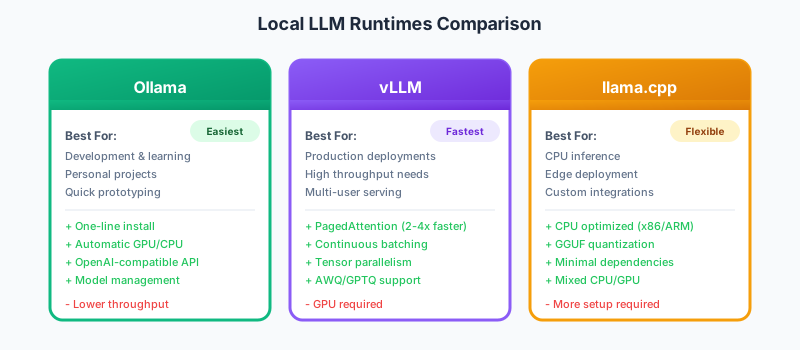
Ollama: The User-Friendly Choice
Ollama makes running local LLMs as simple as running Docker containers. It handles model downloads, quantization selection, and GPU/CPU allocation automatically.
Target audience: Developers, researchers, hobbyists who want to experiment quickly.
vLLM: The Production Powerhouse
vLLM is optimized for serving LLMs at scale. Its PagedAttention algorithm and continuous batching deliver 2-4x higher throughput than naive implementations.
Target audience: Teams deploying LLMs for production applications with multiple concurrent users.
llama.cpp: The Flexible Foundation
The C++ inference engine that powers Ollama and many other tools. Direct use gives maximum control but requires more setup.
Target audience: Developers building custom integrations or deploying to edge devices.
Part 1: Getting Started with Ollama
Ollama is the fastest path from zero to running a local LLM.
Installation
# macOS / Linux
curl -fsSL https://ollama.ai/install.sh | sh

# Windows: Download from https://ollama.ai
Basic Usage
# Pull a model (downloads once, then cached)
ollama pull llama3.2

# Start an interactive chat
ollama run llama3.2

# List downloaded models
ollama list

# Get model information
ollama show llama3.2
That's it—you're now running a 3B parameter language model locally.
Understanding Model Choices
Ollama hosts many open-source models. Here's how to choose:
| Model | Parameters | RAM Needed | Best For |
|---|---|---|---|
| llama3.2 | 3B | 4GB | Quick tasks, constrained resources |
| llama3.1 | 8B | 8GB | Balanced quality/speed |
| llama3.1:70b | 70B | 48GB+ | Maximum open-source quality |
| mistral | 7B | 6GB | Efficient, good at code |
| codellama | 7B-34B | 6-24GB | Specialized for programming |
| phi3 | 3.8B | 4GB | Surprisingly capable for size |
| qwen2.5 | 7B-72B | 6-48GB | Strong multilingual |
The naming convention: model:variant (e.g., llama3.1:70b-q4_K_M)
- The number after the colon indicates size or quantization
q4_K_Mmeans 4-bit quantization (smaller but slightly lower quality)
Using Ollama Programmatically
Python Integration
The Ollama Python library provides a simple interface for interacting with locally-running models. Instead of managing HTTP connections or parsing JSON responses manually, you can call models with a single function that handles all the complexity. The API mirrors the chat-completion format you're familiar with from OpenAI.
import ollama

# Simple completion
response = ollama.chat(
    model='llama3.2',
    messages=[{'role': 'user', 'content': 'Explain quantum computing briefly'}]
)
print(response['message']['content'])
Streaming Responses
For longer outputs, streaming provides a better user experience by displaying tokens as they're generated rather than waiting for the complete response. This is especially important for local models where generation might take several seconds. Setting stream=True returns an iterator that yields each token as it becomes available.
stream = ollama.chat(
    model='llama3.2',
    messages=[{'role': 'user', 'content': 'Write a short story about AI'}],
    stream=True
)

for chunk in stream:
    print(chunk['message']['content'], end='', flush=True)
OpenAI SDK Compatibility
Ollama exposes an OpenAI-compatible API, making migration from cloud to local models straightforward. You can use the same OpenAI Python library you're already familiar with—just point it at Ollama's local server. This compatibility means you can swap between providers by changing a single configuration, making it easy to prototype locally and deploy to cloud or vice versa.
from openai import OpenAI

client = OpenAI(
    base_url="http://localhost:11434/v1",
    api_key="ollama"  # Required but unused
)

response = client.chat.completions.create(
    model="llama3.2",
    messages=[{"role": "user", "content": "Hello!"}]
)
Creating Custom Models
Ollama's Modelfile lets you create specialized model variants without actual fine-tuning. Think of it as creating a preset configuration: you define a base model, a system prompt that shapes the model's behavior, and generation parameters tuned for your use case. This is perfect for creating role-specific assistants (coding expert, customer support, technical writer) that maintain consistent behavior across sessions.
# Save as Modelfile
FROM llama3.2

# Set a custom system prompt
SYSTEM You are a senior Python developer who writes clean, documented code.

# Adjust generation parameters
PARAMETER temperature 0.2
PARAMETER top_p 0.9
# Create and use your custom model
ollama create python-expert -f Modelfile
ollama run python-expert
Part 2: vLLM for Production
When you need high throughput and professional deployment, vLLM is the answer.
How vLLM Achieves Speed
vLLM's performance comes from two key innovations:
PagedAttention: Traditional LLM inference reserves contiguous GPU memory for each request's key-value cache. PagedAttention uses non-contiguous memory blocks (like virtual memory in operating systems), reducing waste from 60-80% to near zero.
Continuous Batching: Instead of waiting for a batch to complete before starting new requests, vLLM dynamically adds and removes requests from the batch. This keeps the GPU consistently busy.
The result: 2-4x higher throughput than naive serving.
Setting Up vLLM
pip install vllm

# Start an OpenAI-compatible server
python -m vllm.entrypoints.openai.api_server \
    --model meta-llama/Meta-Llama-3.1-8B-Instruct \
    --port 8000
Then use it like any OpenAI API:
from openai import OpenAI

client = OpenAI(base_url="http://localhost:8000/v1", api_key="unused")
response = client.chat.completions.create(
    model="meta-llama/Meta-Llama-3.1-8B-Instruct",
    messages=[{"role": "user", "content": "Hello!"}]
)
When to Use vLLM Over Ollama
| Scenario | Choose |
|---|---|
| Learning/experimenting | Ollama |
| Single user, occasional use | Ollama |
| Multiple concurrent users | vLLM |
| Production API backend | vLLM |
| Maximum throughput needed | vLLM |
| CPU inference | Ollama (uses llama.cpp) |
| Quick model switching | Ollama |
Part 3: Practical Applications
Building a Local RAG System
Combine local LLMs with retrieval for a private knowledge base:
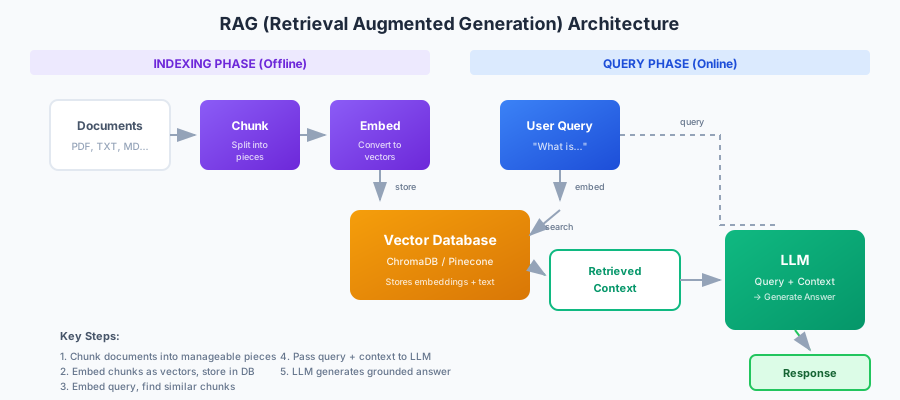
The key components:
- Embedding model for converting documents to vectors
- Vector database for similarity search
- Local LLM for generating answers
Ollama can run embedding models just like chat models. The nomic-embed-text model is a good choice—it's fast, produces quality embeddings, and runs efficiently on consumer hardware. Combined with ChromaDB for vector storage, you have a complete private RAG system that never sends data to external servers.
The workflow is:
- Embed each document and store both the embedding and text in ChromaDB
- When a question comes in, embed it with the same model
- Find the most similar documents using cosine similarity
- Pass the retrieved documents as context to the chat model
- The LLM generates an answer grounded in your documents
import ollama
import chromadb

# Initialize vector database
client = chromadb.Client()
collection = client.create_collection("docs")

# Index your documents
documents = [
    "Python was created by Guido van Rossum in 1991.",
    "Machine learning uses algorithms to learn from data.",
    "Docker containers package applications with dependencies."
]

# Simple embedding using Ollama
for i, doc in enumerate(documents):
    response = ollama.embeddings(model='nomic-embed-text', prompt=doc)
    collection.add(
        ids=[f"doc_{i}"],
        embeddings=[response['embedding']],
        documents=[doc]
    )

# Query the knowledge base
def ask(question):
    # Get question embedding
    q_embedding = ollama.embeddings(model='nomic-embed-text', prompt=question)

    # Find relevant documents
    results = collection.query(
        query_embeddings=[q_embedding['embedding']],
        n_results=2
    )
    context = "\n".join(results['documents'][0])

    # Generate answer with context
    response = ollama.chat(
        model='llama3.2',
        messages=[
            {'role': 'system', 'content': f'Answer based on this context:\n{context}'},
            {'role': 'user', 'content': question}
        ]
    )
    return response['message']['content']

print(ask("Who created Python?"))
This entire system runs locally—your documents never leave your machine.
Hardware Considerations
Understanding memory requirements helps choose the right model:
| Model Size | Minimum RAM | Recommended GPU | Notes |
|---|---|---|---|
| 1-3B | 4GB | None (CPU OK) | Fast on M1/M2/M3 Macs |
| 7-8B | 8GB | 8GB VRAM | RTX 3070 or better |
| 13B | 16GB | 12GB VRAM | RTX 3080+ |
| 30-34B | 32GB | 24GB VRAM | RTX 4090 |
| 70B | 64GB | 48GB+ VRAM | Multi-GPU or quantized |
For Apple Silicon Macs: Ollama automatically uses Metal acceleration. A 7B model runs smoothly on M1 with 16GB unified memory.
For NVIDIA GPUs: Most models run well on RTX 3080 (10GB) or better. The RTX 4090 (24GB) is the sweet spot for enthusiasts.
CPU-only: Possible but slower. A 7B model might generate 5-10 tokens/second on a modern CPU vs. 50+ on GPU.
Common Issues and Solutions
Out of Memory
Symptoms: Model fails to load or crashes during generation.
Solutions:
- Use a smaller quantization:
ollama run llama3.2:q4_0instead of default - Reduce context length in Modelfile:
PARAMETER num_ctx 2048 - Try a smaller model: 7B instead of 13B
- For vLLM:
--gpu-memory-utilization 0.9and--max-model-len 4096
Slow Performance
Check these in order:
- GPU detected? Run
nvidia-smior check Ollama logs - Correct driver? CUDA toolkit should match your GPU
- Thermal throttling? Monitor GPU temperature
- Memory swapping? Model may be too large for VRAM
Model Not Found
Ollama can't find the model you requested:
- Check spelling:
llama3.2notllama-3.2 - Pull first:
ollama pull llama3.2 - Check available models: https://ollama.ai/library
Conclusion
Running LLMs locally is now accessible to anyone with a modern computer. The choice between approaches is clear:
Start with Ollama for learning, development, and personal projects. The simplicity can't be beat.
Graduate to vLLM when you need production performance with multiple users or maximum throughput.
Consider llama.cpp directly for edge deployment, embedded systems, or when you need maximum control.
The gap between local and cloud-hosted models continues to narrow. Each generation of open-source models gets closer to proprietary quality, while tools like Ollama make them increasingly accessible.
References
- Ollama - Run LLMs locally with ease.
- vLLM Documentation - High-throughput LLM serving.
- Kwon, W., et al. (2023). "Efficient Memory Management for Large Language Model Serving with PagedAttention". SOSP 2023.
- llama.cpp - Inference of LLaMA models in pure C/C++.
- Hugging Face Open LLM Leaderboard - Compare open-source model performance.