- Published on
LLM Quantization: GPTQ, AWQ, GGUF and When to Use Each
- Authors

- Name
- Jared Chung
Introduction
Large Language Models are incredibly powerful—but also incredibly resource-hungry. A 70-billion parameter model in full precision requires roughly 140GB of memory, far exceeding what any consumer GPU can handle. So how do people run these models on laptops and gaming PCs?
The answer is quantization: a technique that dramatically reduces memory requirements while preserving most of the model's capabilities. In this post, we'll demystify quantization, understand the different methods, and learn when to use each approach.
What is Quantization?
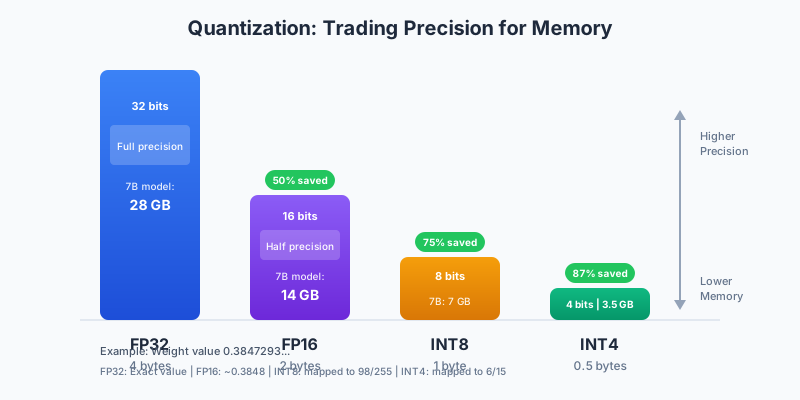
At its core, quantization is about trading precision for memory. Instead of storing model weights as high-precision floating-point numbers (32 or 16 bits), we store them as smaller integers (8 or 4 bits).
The Math Behind It
A neural network weight like 0.3847293 would normally be stored as a 32-bit floating-point number. Through quantization:
| Format | Storage | How It Works |
|---|---|---|
| FP32 | 4 bytes | Exact value stored as floating point |
| FP16 | 2 bytes | Reduced precision, stores ~0.3848 |
| INT8 | 1 byte | Mapped to integer 98 (in range 0-255) |
| INT4 | 0.5 bytes | Mapped to integer 6 (in range 0-15) |
The key insight: Neural networks are remarkably tolerant of reduced precision. The small errors introduced by quantization tend to average out, and the model still produces coherent, useful outputs.
Memory Savings at Scale
The savings become dramatic for large models:
| Model Size | FP32 | FP16 | INT8 | INT4 |
|---|---|---|---|---|
| 7B params | 28 GB | 14 GB | 7 GB | 3.5 GB |
| 13B params | 52 GB | 26 GB | 13 GB | 6.5 GB |
| 70B params | 280 GB | 140 GB | 70 GB | 35 GB |
A 4-bit quantized 70B model can run on a single high-end consumer GPU (48GB)—something impossible with full precision.
Understanding the Methods
Different quantization methods take different approaches to the precision-quality trade-off. Each has strengths for specific use cases.
The Landscape
| Method | Best For | GPU Required | Quality |
|---|---|---|---|
| GPTQ | GPU inference | Yes | Good |
| AWQ | GPU inference (modern) | Yes (Ampere+) | Better |
| GGUF | CPU/mixed inference | No | Good |
| bitsandbytes | Fine-tuning | Yes | Good |
GPTQ: The GPU Workhorse
GPTQ (Generalized Post-Training Quantization) was one of the first practical methods for 4-bit LLM quantization. It remains popular due to its wide compatibility.
How GPTQ Works
The methodology behind GPTQ involves three key steps:
1. Calibration: The algorithm runs a small set of sample inputs through the model to understand how weights are actually used. This helps identify which weights matter most.
2. Optimal Quantization: Using the calibration data, GPTQ solves an optimization problem to find the best integer values that minimize output error. Weights that significantly affect outputs get more careful treatment.
3. Group Quantization: Weights are quantized in groups (typically 128 weights per group). Each group has its own scale and zero-point, allowing better precision where needed.
When to Use GPTQ
Pros:
- Works on any CUDA GPU
- Fast inference
- Mature ecosystem with many pre-quantized models
- Good quality at 4-bit
Cons:
- Slightly lower quality than AWQ on modern GPUs
- Requires calibration data for custom quantization
- GPU-only (no CPU inference)
Using GPTQ in Practice
Most users download pre-quantized models rather than quantizing themselves. The Hugging Face Hub hosts thousands of GPTQ models, with TheBloke being the most prolific contributor. Loading a GPTQ model is identical to loading a regular model—the transformers library handles the quantized weights transparently.
from transformers import AutoModelForCausalLM, AutoTokenizer

# TheBloke provides many pre-quantized models
model = AutoModelForCausalLM.from_pretrained(
    "TheBloke/Llama-2-7B-GPTQ",
    device_map="auto"
)
tokenizer = AutoTokenizer.from_pretrained("TheBloke/Llama-2-7B-GPTQ")

# Use like any other model
inputs = tokenizer("Hello, how are you?", return_tensors="pt").to("cuda")
outputs = model.generate(**inputs, max_new_tokens=50)
print(tokenizer.decode(outputs[0]))
AWQ: Better Quality on Modern GPUs
AWQ (Activation-aware Weight Quantization) is a newer method that often achieves better quality than GPTQ by being smarter about which weights matter most.
How AWQ Works
The key insight behind AWQ: not all weights are equally important. Some weights, when quantized poorly, cause large output errors. Others can be quantized aggressively with minimal impact.
AWQ identifies these important weights by looking at activation patterns—how inputs actually flow through the network. Weights that frequently interact with large activations are treated more carefully during quantization.
The methodology:
- Activation analysis: Run sample inputs and track which weights produce large activations
- Importance scoring: Weight importance = average magnitude of activations it processes
- Adaptive quantization: Important weights get higher effective precision through scaling tricks
When to Use AWQ
Pros:
- Better quality than GPTQ at same bit width
- Fast inference on modern GPUs
- Growing ecosystem of pre-quantized models
Cons:
- Requires Ampere or newer GPU (RTX 30xx, 40xx)
- Less mature than GPTQ
- GPU-only
AWQ vs GPTQ Quality
In benchmarks, AWQ typically shows 1-3% lower perplexity (better) than GPTQ at 4-bit:
| Model | FP16 (baseline) | GPTQ-4bit | AWQ-4bit |
|---|---|---|---|
| Llama-2-7B | 5.47 | 5.62 (+2.7%) | 5.58 (+2.0%) |
| Llama-2-13B | 4.88 | 5.01 (+2.7%) | 4.97 (+1.8%) |
| Mistral-7B | 5.25 | 5.38 (+2.5%) | 5.34 (+1.7%) |
The difference is meaningful for production applications where every bit of quality matters.
GGUF: The Flexible Format
GGUF (GPT-Generated Unified Format) is designed for the llama.cpp ecosystem. Unlike GPTQ and AWQ which are GPU-focused, GGUF enables efficient inference on CPUs with optional GPU acceleration.
How GGUF Works
GGUF uses a different approach called k-quant that's optimized for CPU inference:
Mixed-precision blocks: Instead of uniform quantization, GGUF uses different precision levels within the same layer. Some blocks get 6 bits, others get 4 or even 2 bits.
CPU-optimized kernels: The format includes highly optimized code paths for x86 (Intel/AMD) and ARM (Apple Silicon) CPUs.
Flexible offloading: You can offload some layers to GPU while keeping others on CPU, enabling larger models than your GPU memory alone would allow.
GGUF Quantization Levels
GGUF offers fine-grained control over the quality-size trade-off:
| Quant Type | Bits | Size (7B) | Quality | Use Case |
|---|---|---|---|---|
| Q2_K | 2 | 2.5 GB | Low | Extreme memory constraints |
| Q3_K_M | 3 | 3.3 GB | Fair | Low-memory systems |
| Q4_K_M | 4 | 4.0 GB | Good | Recommended default |
| Q5_K_M | 5 | 4.8 GB | Very Good | Quality-focused |
| Q6_K | 6 | 5.5 GB | Excellent | Near-lossless |
| Q8_0 | 8 | 7.0 GB | Near FP16 | Maximum quality |
Recommendation: Start with Q4_K_M for the best balance of size and quality. Move to Q5_K_M if you notice quality issues.
When to Use GGUF
Pros:
- Runs on CPU (no GPU required)
- Works on Mac, Windows, Linux
- Excellent for Apple Silicon (M1/M2/M3)
- Fine-grained size/quality control
- Used by Ollama, LM Studio, and other popular tools
Cons:
- Slower than GPU-optimized formats
- More complex ecosystem (many quant variants)
Using GGUF with Ollama
The easiest way to use GGUF models:
# Install Ollama
curl -fsSL https://ollama.ai/install.sh | sh

# Run a model (automatically downloads GGUF)
ollama run llama3.2

# Or use a specific quantization
ollama run llama3.2:7b-q4_K_M
bitsandbytes: The Training-Friendly Option
Unlike the other methods, bitsandbytes is designed primarily for training and fine-tuning, not just inference.
How bitsandbytes Works
bitsandbytes uses a technique called NF4 (Normal Float 4-bit):
Dynamic quantization: Weights are quantized on-the-fly during the forward pass and dequantized when needed for gradient computation.
Nested quantization: The quantization constants themselves can be quantized, saving additional memory.
Gradient-friendly: Unlike static quantization, bitsandbytes maintains the ability to compute gradients through the quantized weights.
When to Use bitsandbytes
The primary use case: Fine-tuning large models with QLoRA.
QLoRA (Quantized Low-Rank Adaptation) lets you fine-tune a 70B model on a single GPU by:
- Loading the base model in 4-bit using bitsandbytes
- Adding small trainable LoRA adapters
- Only training the adapters while the frozen base model stays quantized
from transformers import AutoModelForCausalLM, BitsAndBytesConfig
import torch

# 4-bit config for QLoRA
config = BitsAndBytesConfig(
    load_in_4bit=True,
    bnb_4bit_quant_type="nf4",
    bnb_4bit_compute_dtype=torch.bfloat16,
    bnb_4bit_use_double_quant=True
)

model = AutoModelForCausalLM.from_pretrained(
    "meta-llama/Llama-2-7b-hf",
    quantization_config=config,
    device_map="auto"
)
# Now add LoRA adapters and train!
Choosing the Right Method
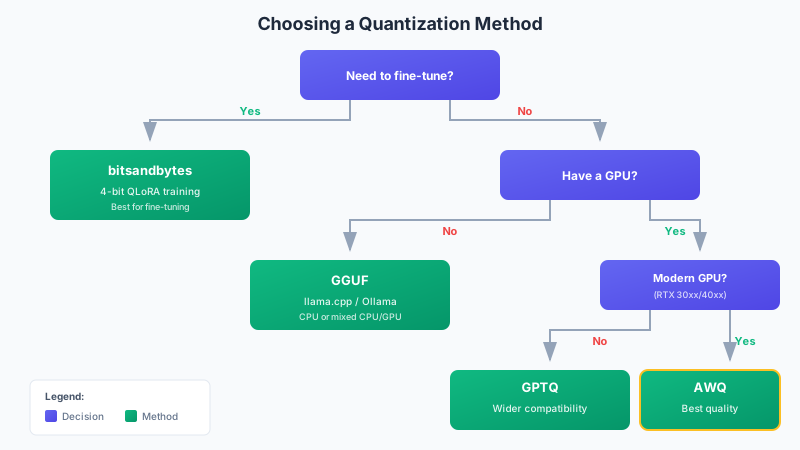
Use this decision tree to pick the right quantization approach:
Quick Reference
| Scenario | Method | Why |
|---|---|---|
| Fine-tuning a model | bitsandbytes | Only option that supports training |
| GPU inference, best quality | AWQ | Better quality than GPTQ |
| GPU inference, older GPU | GPTQ | Works on any CUDA GPU |
| CPU/Mac inference | GGUF | Optimized for non-GPU |
| Resource-constrained | GGUF Q2/Q3 | Smallest possible size |
| Local app (Ollama) | GGUF | Native format |
Practical Considerations
Quality vs Speed vs Memory
Every quantization decision involves trade-offs:
Lower bits = smaller size but potentially lower quality and sometimes faster inference (less memory bandwidth needed).
Higher bits = better quality but larger memory footprint and potentially slower (more data to transfer).
For most use cases, 4-bit quantization hits the sweet spot—models fit on consumer hardware with minimal quality loss.
Pre-quantized vs DIY
Use pre-quantized models when:
- You're using a popular base model (Llama, Mistral, etc.)
- You want to get started quickly
- Quality is sufficient for your needs
Quantize yourself when:
- You've fine-tuned a custom model
- You need a specific quantization configuration
- Pre-quantized versions aren't available
Finding Pre-quantized Models
The best source for pre-quantized models is TheBloke on Hugging Face, who provides GPTQ, AWQ, and GGUF versions of most popular models.
Model naming convention:
Llama-2-7B-GPTQ= GPTQ 4-bitLlama-2-7B-AWQ= AWQ 4-bitllama-2-7b.Q4_K_M.gguf= GGUF 4-bit (K-quant Medium)
Common Issues and Solutions
Out of Memory
If you're hitting OOM errors:
- Try a smaller quantization: Q4 → Q3 or Q2
- Reduce context length: Less memory for KV cache
- Offload layers: Split between GPU and CPU
- Use a smaller model: 7B instead of 13B
Slow Inference
If inference is too slow:
- For CPU: Use GGUF with GPU layer offloading
- For GPU: Ensure you're using the right format (GPTQ/AWQ, not GGUF)
- Check memory bandwidth: Quantization helps here by reducing data movement
Quality Issues
If outputs seem degraded:
- Try higher bit quantization: Q4 → Q5 or Q6
- Try a different method: AWQ often beats GPTQ
- Check calibration: Custom quantization may need better calibration data
Conclusion
Quantization democratizes access to large language models. What once required data center GPUs now runs on laptops and gaming PCs.
Key takeaways:
- Start with pre-quantized models: TheBloke and Hugging Face have you covered
- Use Q4_K_M GGUF for local inference: Best balance for most users
- Use AWQ for GPU production: Best quality on modern hardware
- Use bitsandbytes for fine-tuning: The only option that supports training
- Quality loss is minimal: 4-bit models are typically 95-98% as capable as full precision
The field continues to evolve rapidly. New methods regularly improve the quality-size trade-off, and the gap between quantized and full-precision models continues to shrink.
References
- Frantar, E., et al. (2022). "GPTQ: Accurate Post-Training Quantization for Generative Pre-trained Transformers". ICLR 2023.
- Lin, J., et al. (2023). "AWQ: Activation-aware Weight Quantization for LLM Compression and Acceleration". MLSys 2024.
- llama.cpp - Inference of LLaMA models in pure C/C++.
- bitsandbytes - Lightweight CUDA wrappers for 8-bit optimizers and quantization.
- TheBloke on Hugging Face - Pre-quantized models in various formats.
- Dettmers, T., et al. (2023). "QLoRA: Efficient Finetuning of Quantized LLMs". NeurIPS 2023.