- Published on
Multimodal AI: Building with Vision-Language Models
- Authors

- Name
- Jared Chung
Introduction
What if an AI could look at a photo and have a conversation about it? That's exactly what Vision-Language Models (VLMs) enable. These multimodal AI systems combine the visual understanding of image models with the reasoning and language capabilities of LLMs, opening up applications that were impossible just a few years ago.
In this post, we'll demystify how these models work, explore the key players in the field, and learn when to use which approach.
Understanding Vision-Language Models
The Core Challenge
Traditional language models only understand text. Traditional vision models can classify images or detect objects, but can't explain what they see in natural language. VLMs bridge this gap by creating a unified system that can:
- See: Process and understand visual content
- Reason: Think about what's in an image
- Communicate: Describe, answer questions, and have conversations about images
How VLMs Work
The architecture of a VLM consists of three main components working together:
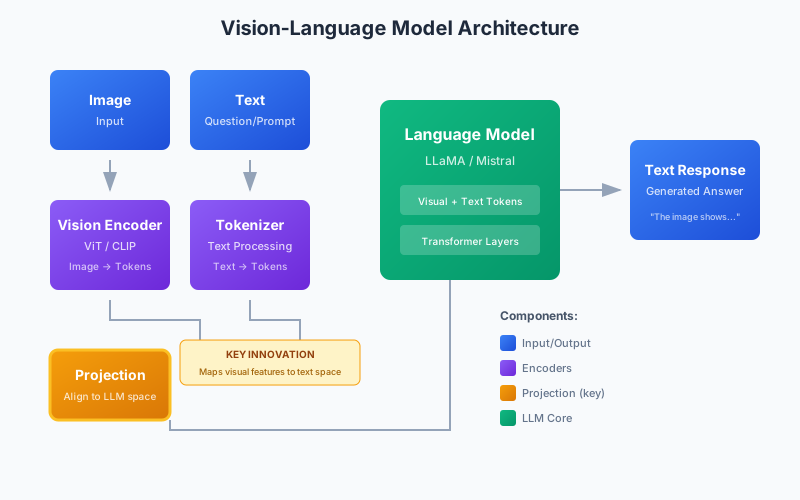
Let's break down each component:
1. Vision Encoder
The vision encoder converts an image into a sequence of numerical representations (embeddings) that capture visual information. Most modern VLMs use a Vision Transformer (ViT) pretrained with CLIP.
How it works:
- The image is divided into small patches (typically 14x14 or 16x16 pixels)
- Each patch is converted to an embedding
- Self-attention mechanisms help the model understand relationships between patches
- The output is a sequence of "visual tokens" that represent different parts of the image
Key insight: CLIP was trained on 400 million image-text pairs from the internet, learning to associate images with their descriptions. This means the vision encoder already "knows" concepts like "dog," "sunset," or "office building" from its pretraining.
2. Projection Layer (The Key Innovation)
Here's the crucial insight that makes VLMs work: the projection layer maps visual embeddings into the same space as text embeddings.
Think of it like a translator. The vision encoder speaks "vision language" and the LLM speaks "text language." The projection layer translates between them, allowing the LLM to process visual information as if it were just more text tokens.
This is typically just 1-2 linear layers with about 8 million parameters—tiny compared to the rest of the model. But this small component is what enables the magic of multimodal understanding.
3. Language Model Backbone
The language model (typically LLaMA, Mistral, or similar) receives a combined sequence of:
- Visual tokens from the projection layer
- Text tokens from the user's question
From the LLM's perspective, it's just processing tokens and generating a response. It doesn't "know" some tokens came from an image—it simply learned during training that these particular tokens carry visual meaning.
The Training Methodology
VLMs aren't trained in one step. The process involves multiple stages, each building on the previous:
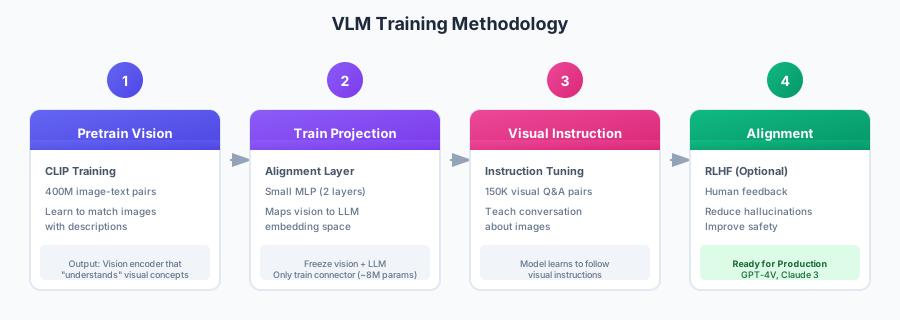
Stage 1: Pretrain the Vision Encoder
Before building a VLM, you need a vision encoder that understands images. CLIP training involves:
- Showing the model millions of image-text pairs
- Training it to match images with their correct descriptions
- Learning a shared embedding space where similar concepts cluster together
Result: A vision encoder that can extract meaningful representations from any image.
Stage 2: Train the Projection Layer
With frozen vision encoder and frozen LLM, only the small projection layer is trained:
- Use image-caption pairs as training data
- The model learns to predict the caption given the image
- The projection layer learns the "translation" between vision and language spaces
Why freeze everything else? Both the vision encoder and LLM were trained on massive datasets. We want to preserve those capabilities while just learning how to connect them.
Stage 3: Visual Instruction Tuning
This is where the model learns to be helpful. Using datasets like:
- Visual question-answering pairs
- Image description requests
- Multi-turn conversations about images
- Complex reasoning tasks
The model learns not just to describe images, but to follow instructions, answer specific questions, and engage in dialogue.
Stage 4: Alignment (Optional)
Commercial models like GPT-4V and Claude 3 undergo additional training with human feedback (RLHF) to:
- Reduce hallucinations (making up things not in the image)
- Improve safety (refusing harmful requests)
- Better follow user intent
The Multimodal Landscape
Commercial Models
| Model | Provider | Strengths | Context | Best For |
|---|---|---|---|---|
| GPT-4V/GPT-4o | OpenAI | Best overall quality, reliable | 128K | Production apps requiring highest quality |
| Claude 3 | Anthropic | Strong reasoning, long context | 200K | Complex analysis, documents |
| Gemini Pro Vision | Fast, good value | 32K | Cost-sensitive applications |
Open Source Models
| Model | Parameters | License | Strengths |
|---|---|---|---|
| LLaVA 1.6 | 7B-34B | Apache 2.0 | Best general-purpose open model |
| Qwen-VL | 7B | Qwen License | Excellent multilingual support |
| CogVLM | 17B | Apache 2.0 | High quality, research-focused |
| InternVL | 6B-26B | MIT | Strong Chinese + English |
Choosing the Right Model
Use commercial models (GPT-4V, Claude 3) when:
- Quality is the top priority
- You need reliable production performance
- Your data can be sent to external APIs
- Budget allows for per-token pricing
Use open source models (LLaVA, Qwen-VL) when:
- Data must stay on your infrastructure (privacy/compliance)
- You need to fine-tune for your specific domain
- Running costs must be minimized
- You want to experiment and learn
Key Concepts and Methodology
How Visual Tokens Work
When a VLM processes an image, it doesn't see pixels—it sees tokens. For a typical model:
- A 336x336 image is divided into 576 patches (24x24 grid)
- Each patch becomes one visual token
- These 576 tokens are prepended to the text tokens
- The LLM processes everything together
Implication: Larger images mean more tokens, which means higher cost and longer processing. Most APIs let you choose "low" or "high" detail modes to control this trade-off.
The Importance of Prompting
Just like text LLMs, VLMs respond better to well-crafted prompts. Key strategies:
Be specific about what you want:
- Instead of: "What's in this image?"
- Try: "List all the objects visible in this image, including their approximate positions."
Provide context:
- Instead of: "Analyze this."
- Try: "This is a medical X-ray. Describe any abnormalities you observe."
Ask for structured output:
- Instead of: "Extract the data."
- Try: "Extract the invoice data as JSON with fields: invoice_number, date, total, line_items."
Understanding Limitations
VLMs have important limitations to understand:
Hallucinations: The model may confidently describe things that aren't in the image. Always verify critical information.
OCR imperfections: While VLMs can read text in images, they may make errors with unusual fonts, handwriting, or low resolution.
Spatial reasoning: Understanding precise spatial relationships ("is X to the left of Y?") can be challenging.
Small details: Fine details may be missed, especially in complex or cluttered images.
Knowledge cutoff: The model knows about concepts from its training data, not real-time information.
Practical Applications
Document Understanding
VLMs excel at extracting information from documents, forms, receipts, and invoices. The methodology:
- Capture high-quality images - Resolution matters for text extraction
- Use structured prompts - Tell the model exactly what fields to extract
- Request JSON output - Makes parsing reliable
- Validate results - Cross-check extracted values when possible
Visual Question Answering
Building interactive systems where users can ask questions about images:
- First message includes the image - Establishes the visual context
- Subsequent messages are text-only - The model remembers the image
- Maintain conversation history - For context-aware follow-ups
Chart and Graph Analysis
VLMs can interpret charts, graphs, and data visualizations:
- Identify chart type and axes
- Extract approximate data values
- Describe trends and patterns
- Compare multiple data series
Best practice: Ask for specific numbers when visible, but understand estimates for read-from-graph values.
Image-Based Search (RAG for Images)
Use CLIP embeddings to build visual search systems:
- Index: Convert images to embeddings using CLIP
- Store: Save embeddings in a vector database
- Search: Convert text query to embedding, find similar images
- Analyze: Send retrieved images to VLM for detailed analysis
This combines the speed of vector search with the reasoning capability of VLMs.
Production Considerations
Cost Optimization
VLM API calls are more expensive than text-only calls due to image processing. Strategies:
| Strategy | Savings | Trade-off |
|---|---|---|
| Use "low" detail mode | ~70% | Less accuracy on fine details |
| Use GPT-4o-mini | ~90% | Lower quality for complex tasks |
| Cache repeated analyses | 100% | Stale results for changing images |
| Batch similar requests | Variable | Added latency |
Latency
Image processing adds latency. For real-time applications:
- Consider local models (LLaVA via Ollama) for sub-second response
- Use lower resolution when speed matters
- Implement streaming for better perceived performance
Privacy
If your images contain sensitive data:
- Use local models (LLaVA, Qwen-VL)
- Run on your own infrastructure
- Avoid cloud APIs that may retain data
Getting Started
Quick Start with OpenAI
The simplest way to start experimenting with VLMs is through OpenAI's API. Images can be sent either as base64-encoded data or as URLs. The message format uses a list of content blocks where you can mix text and images in any order.
The workflow is straightforward:
- Read the image file and encode it as base64
- Construct a message with both text and image content blocks
- Send to the API and receive the model's analysis
from openai import OpenAI
import base64

client = OpenAI()

def analyze_image(image_path: str, question: str) -> str:
    with open(image_path, "rb") as f:
        image_data = base64.b64encode(f.read()).decode()

    response = client.chat.completions.create(
        model="gpt-4o",
        messages=[{
            "role": "user",
            "content": [
                {"type": "text", "text": question},
                {"type": "image_url", "image_url": {
                    "url": f"data:image/jpeg;base64,{image_data}"
                }}
            ]
        }]
    )
    return response.choices[0].message.content

# Example
result = analyze_image("chart.png", "What trends do you see in this chart?")
Quick Start with Ollama (Local)
For local, private image analysis, Ollama provides LLaVA and other vision models that run entirely on your machine. This keeps your images completely private—no data is sent to external servers. The Ollama Python library handles image loading automatically when you pass file paths in the images list.
# Install Ollama and pull LLaVA
ollama pull llava

# Analyze an image
ollama run llava "Describe this image: ./photo.jpg"
import ollama

response = ollama.chat(
    model='llava',
    messages=[{
        'role': 'user',
        'content': 'What objects are in this image?',
        'images': ['./photo.jpg']
    }]
)
print(response['message']['content'])
Conclusion
Vision-Language Models represent a fundamental shift in AI capabilities. By combining visual understanding with language reasoning, they enable applications from document processing to visual search to interactive image analysis.
Key takeaways:
Architecture matters: Understanding the vision encoder → projection → LLM pipeline helps you use these models effectively
Choose wisely: Commercial models for quality, open source for privacy and cost
Prompt well: Structured, specific prompts dramatically improve results
Know the limits: Hallucinations and OCR errors require validation for critical applications
Start simple: Begin with GPT-4V for prototyping, then optimize based on your needs
The field is evolving rapidly. Open source models are closing the gap with commercial offerings, and new architectures continue to improve efficiency and capability.
References
- Liu, H., et al. (2023). "Visual Instruction Tuning". NeurIPS 2023.
- GPT-4V System Card. OpenAI.
- Radford, A., et al. (2021). "Learning Transferable Visual Models From Natural Language Supervision". ICML 2021.
- Qwen-VL GitHub Repository. Alibaba.
- OpenAI Vision Guide. OpenAI Documentation.