- Published on
Google's Agent Development Kit (ADK): Building Production Agents
- Authors

- Name
- Jared Chung
Introduction
Google's Agent Development Kit (ADK) is a framework for building, testing, and deploying AI agents. Unlike frameworks that focus on quick prototypes, ADK is designed from the ground up for production workloads, with built-in support for evaluation, monitoring, and enterprise deployment through Vertex AI.
This guide covers ADK's architecture, key features, and how to build agents that can handle real-world complexity.
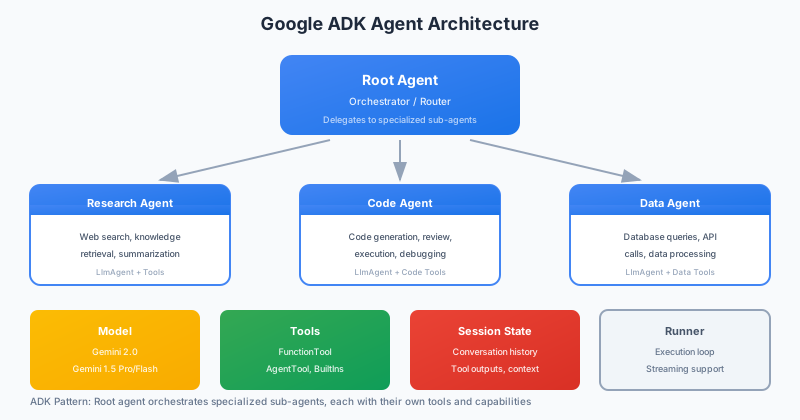
What is ADK?
ADK provides a structured approach to agent development:
| Feature | Description |
|---|---|
| Agent abstractions | Pre-built agent types for common patterns |
| Tool framework | Structured tool definitions with validation |
| Multi-agent support | Orchestration of multiple specialized agents |
| Evaluation tools | Built-in testing and benchmarking |
| Vertex AI integration | Deploy to production with monitoring |
Installation
pip install google-adk
For Vertex AI integration:
pip install google-adk[vertexai]
Core Concepts
Agents
An ADK agent is a stateful entity that can reason, use tools, and maintain memory:
from google_adk import Agent
from google_adk.models import Gemini

# Create a basic agent
agent = Agent(
    name="research-assistant",
    model=Gemini(model="gemini-1.5-pro"),
    instructions="""You are a research assistant that helps users
    find and summarize information. Be thorough but concise.
    Always cite your sources.""",
)

# Use the agent
response = agent.run("What are the latest developments in fusion energy?")
print(response.content)
Tools
Tools extend what agents can do:
from google_adk import Tool, Parameter
from google_adk.tools import web_search, code_execution

# Use built-in tools
agent = Agent(
    name="coding-assistant",
    model=Gemini(model="gemini-1.5-pro"),
    tools=[
        web_search(),        # Search the web
        code_execution(),    # Run Python code
    ],
)

# Create custom tools
@Tool(
    description="Get current stock price for a symbol",
    parameters=[
        Parameter(name="symbol", type="string", description="Stock ticker symbol"),
    ]
)
def get_stock_price(symbol: str) -> dict:
    # Your implementation
    import yfinance as yf
    stock = yf.Ticker(symbol)
    return {
        "symbol": symbol,
        "price": stock.info.get("currentPrice"),
        "currency": stock.info.get("currency"),
    }

# Add to agent
agent = Agent(
    name="finance-assistant",
    model=Gemini(model="gemini-1.5-pro"),
    tools=[get_stock_price],
)
Memory
ADK provides different memory types:
from google_adk.memory import (
    ConversationMemory,
    VectorMemory,
    StructuredMemory,
)

# Conversation history
conversation = ConversationMemory(max_turns=20)

# Semantic memory with vector search
vector_memory = VectorMemory(
    embedding_model="text-embedding-004",
    max_items=1000,
)

# Structured facts
structured = StructuredMemory(schema={
    "user_preferences": {"type": "object"},
    "past_actions": {"type": "array"},
})

agent = Agent(
    name="personal-assistant",
    model=Gemini(model="gemini-1.5-pro"),
    memory=[conversation, vector_memory, structured],
)
Agent Types
ADK provides specialized agent types for common patterns.
ReAct Agent
The classic reasoning + acting pattern:
from google_adk.agents import ReActAgent

agent = ReActAgent(
    name="problem-solver",
    model=Gemini(model="gemini-1.5-pro"),
    tools=[search_tool, calculator_tool, code_tool],
    max_iterations=10,
    reflection_prompt="Before continuing, verify your last action produced useful results.",
)
Workflow Agent
For structured, multi-step processes:
from google_adk.agents import WorkflowAgent
from google_adk.workflows import Step, Condition

workflow = WorkflowAgent(
    name="data-pipeline",
    model=Gemini(model="gemini-1.5-flash"),
    steps=[
        Step(
            name="fetch-data",
            action=fetch_data_tool,
            next="validate-data"
        ),
        Step(
            name="validate-data",
            action=validate_tool,
            conditions=[
                Condition(
                    check=lambda result: result["valid"],
                    next="process-data"
                ),
                Condition(
                    check=lambda result: not result["valid"],
                    next="handle-error"
                ),
            ]
        ),
        Step(
            name="process-data",
            action=process_tool,
            next="complete"
        ),
        Step(
            name="handle-error",
            action=error_handler_tool,
            next="complete"
        ),
    ]
)
Conversational Agent
Optimized for multi-turn conversations:
from google_adk.agents import ConversationalAgent

agent = ConversationalAgent(
    name="customer-support",
    model=Gemini(model="gemini-1.5-pro"),
    persona="""You are a helpful customer support agent for TechCorp.
    Be friendly, patient, and always try to resolve issues on first contact.
    If you can't help, escalate to a human agent.""",
    tools=[
        lookup_order_tool,
        check_inventory_tool,
        create_ticket_tool,
    ],
    escalation_criteria="User explicitly requests human agent or issue unresolved after 3 attempts",
)

# Multi-turn conversation
session = agent.create_session(user_id="user123")
response1 = session.send("I haven't received my order")
response2 = session.send("Order number is #12345")
response3 = session.send("Can you check where it is?")
Multi-Agent Systems
ADK excels at orchestrating multiple agents.
Team of Agents
from google_adk.agents import Team, Agent

# Specialized agents
researcher = Agent(
    name="researcher",
    model=Gemini(model="gemini-1.5-pro"),
    tools=[search_tool, arxiv_tool],
    instructions="You research topics thoroughly and provide detailed findings.",
)

analyst = Agent(
    name="analyst",
    model=Gemini(model="gemini-1.5-pro"),
    instructions="You analyze research findings and extract key insights.",
)

writer = Agent(
    name="writer",
    model=Gemini(model="gemini-1.5-pro"),
    instructions="You write clear, engaging content based on research and analysis.",
)

# Create a team
team = Team(
    name="content-team",
    agents=[researcher, analyst, writer],
    coordinator_model=Gemini(model="gemini-1.5-flash"),
    workflow="sequential",  # or "parallel", "adaptive"
)

# Run the team
result = team.run("Write a comprehensive blog post about quantum computing advances in 2025")
Hierarchical Agents
from google_adk.agents import Supervisor, Worker

# Worker agents
data_worker = Worker(
    name="data-collector",
    tools=[api_tool, scraper_tool],
)

analysis_worker = Worker(
    name="data-analyzer",
    tools=[stats_tool, viz_tool],
)

# Supervisor that delegates
supervisor = Supervisor(
    name="project-manager",
    model=Gemini(model="gemini-1.5-pro"),
    workers=[data_worker, analysis_worker],
    delegation_strategy="capability_based",  # Match tasks to worker skills
)

result = supervisor.run("Analyze competitor pricing data from the last quarter")
Evaluation and Testing
ADK includes robust evaluation tools.
Unit Testing Agents
from google_adk.testing import AgentTestCase, TestScenario

class TestResearchAgent(AgentTestCase):
    def setUp(self):
        self.agent = create_research_agent()

    def test_simple_query(self):
        response = self.agent.run("What is machine learning?")

        self.assertResponseContains(response, ["algorithm", "data", "learning"])
        self.assertToolUsed(response, "search")
        self.assertNoHallucination(response)

    def test_complex_research(self):
        scenario = TestScenario(
            query="Compare transformer and RNN architectures",
            expected_tools=["search", "paper_lookup"],
            expected_concepts=["attention", "sequential", "parallel"],
            max_steps=5,
        )

        result = self.run_scenario(scenario)
        self.assertTrue(result.passed)
Benchmark Evaluation
from google_adk.evaluation import Benchmark, Metric

# Create a benchmark
benchmark = Benchmark(
    name="research-quality",
    test_cases=[
        {"query": "Latest COVID vaccines", "expected_topics": ["mRNA", "efficacy"]},
        {"query": "Climate change solutions", "expected_topics": ["carbon", "renewable"]},
    ],
    metrics=[
        Metric.RELEVANCE,
        Metric.FACTUALITY,
        Metric.COMPLETENESS,
        Metric.TOOL_EFFICIENCY,
    ],
)

# Run evaluation
results = benchmark.evaluate(agent)
print(f"Average relevance: {results.metrics['relevance']:.2%}")
print(f"Factuality score: {results.metrics['factuality']:.2%}")
A/B Testing
from google_adk.evaluation import ABTest

test = ABTest(
    name="prompt-comparison",
    variants={
        "A": agent_with_prompt_a,
        "B": agent_with_prompt_b,
    },
    test_queries=test_dataset,
    metrics=[Metric.USER_SATISFACTION, Metric.RESPONSE_TIME],
)

results = test.run(sample_size=100)
print(f"Variant A: {results['A'].mean_satisfaction:.2f}")
print(f"Variant B: {results['B'].mean_satisfaction:.2f}")
print(f"Statistical significance: {results.p_value:.4f}")
Production Deployment
Vertex AI Integration
Deploy agents to Google Cloud:
from google_adk.deployment import VertexAIDeployment

# Configure deployment
deployment = VertexAIDeployment(
    agent=agent,
    project_id="my-project",
    region="us-central1",
    endpoint_name="research-agent-v1",
    min_replicas=1,
    max_replicas=10,
    machine_type="n1-standard-4",
)

# Deploy
endpoint = deployment.deploy()
print(f"Deployed to: {endpoint.resource_name}")

# Call the deployed agent
from google.cloud import aiplatform

client = aiplatform.gapic.PredictionServiceClient()
response = client.predict(
    endpoint=endpoint.resource_name,
    instances=[{"query": "What's the weather like?"}],
)
Monitoring
from google_adk.monitoring import AgentMonitor

monitor = AgentMonitor(
    agent=agent,
    metrics=[
        "latency",
        "token_usage",
        "tool_calls",
        "error_rate",
        "user_satisfaction",
    ],
    alert_thresholds={
        "error_rate": 0.05,  # Alert if >5% errors
        "latency_p99": 10.0,  # Alert if P99 latency >10s
    },
    export_to="cloud_monitoring",
)
Safety and Guardrails
from google_adk.safety import Guardrails, ContentFilter

guardrails = Guardrails(
    input_filters=[
        ContentFilter.HARMFUL_CONTENT,
        ContentFilter.PII_DETECTION,
    ],
    output_filters=[
        ContentFilter.FACTUALITY_CHECK,
        ContentFilter.BRAND_SAFETY,
    ],
    tool_permissions={
        "code_execution": {"allowed_packages": ["pandas", "numpy"]},
        "web_search": {"blocked_domains": ["example-blocked.com"]},
    },
    rate_limits={
        "requests_per_minute": 60,
        "tokens_per_minute": 100000,
    },
)

agent = Agent(
    name="safe-agent",
    model=Gemini(model="gemini-1.5-pro"),
    guardrails=guardrails,
)
Best Practices
1. Start Simple
# Start with a single agent and minimal tools
agent = Agent(
    name="mvp-agent",
    model=Gemini(model="gemini-1.5-flash"),  # Faster, cheaper
    tools=[essential_tool],
)

# Add complexity only when needed
2. Explicit Instructions
# Bad: vague instructions
agent = Agent(instructions="Help users")

# Good: specific instructions
agent = Agent(
    instructions="""You are a technical support agent for CloudApp.

Your responsibilities:
1. Diagnose user issues by asking clarifying questions
2. Provide step-by-step solutions
3. Escalate to humans if unresolved after 3 attempts

Response format:
- Acknowledge the issue
- Ask one clarifying question OR provide solution
- Offer additional help"""
)
3. Tool Design
# Bad: vague tool
@Tool(description="Do stuff with data")
def process_data(data): ...

# Good: specific, well-documented tool
@Tool(
    description="Calculate summary statistics for numerical data",
    parameters=[
        Parameter(
            name="data",
            type="array",
            description="List of numerical values to analyze"
        ),
        Parameter(
            name="metrics",
            type="array",
            description="Statistics to calculate: mean, median, std, min, max",
            default=["mean", "median"]
        ),
    ],
    returns="Object containing requested statistics"
)
def calculate_statistics(data: list, metrics: list = None) -> dict: ...
4. Error Handling
from google_adk.exceptions import ToolError, ModelError

@Tool(description="Fetch user data")
def fetch_user(user_id: str) -> dict:
    try:
        result = database.get_user(user_id)
        if not result:
            raise ToolError(f"User {user_id} not found", recoverable=True)
        return result
    except DatabaseError as e:
        raise ToolError(f"Database error: {e}", recoverable=False)
Conclusion
ADK provides a structured, production-focused approach to agent development. Its strengths are enterprise features like evaluation, monitoring, and Vertex AI integration that make it easier to go from prototype to production.
Start with the built-in agent types, add tools as needed, and leverage the evaluation framework to ensure quality. The framework handles the infrastructure complexity so you can focus on building useful agents.