- Published on
Prompt Caching: Optimizing LLM API Costs and Latency
- Authors

- Name
- Jared Chung
Introduction
Every time you call an LLM API, you're paying for tokens and waiting for processing. When your prompts share common prefixes like system prompts, few-shot examples, or document context you're paying repeatedly for the same computation.
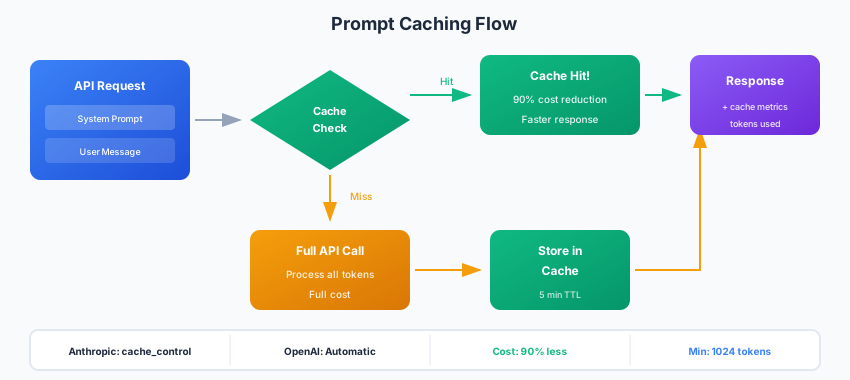
Prompt caching solves this by reusing the computed representations of repeated prompt content. The result: dramatically lower costs and faster responses.
Understanding the Cost Problem
Consider a typical RAG application:
System prompt:     ~500 tokens (same every request)
Document context: ~3000 tokens (same for related queries)
User question:      ~50 tokens (unique)
─────────────────────────────────
Total:             3550 tokens per request
If 95% of your tokens are repeated across requests, you're paying 20x more than necessary.
Real-world impact:
| Scenario | Without Caching | With Caching | Savings |
|---|---|---|---|
| RAG with 4K context | $0.06/query | $0.008/query | 87% |
| Agent with long instructions | $0.04/call | $0.006/call | 85% |
| Code assistant with repo context | $0.15/query | $0.02/query | 87% |
Anthropic Prompt Caching
Anthropic offers native prompt caching for Claude models.
How It Works
Mark content for caching with cache_control. Any message content block can be marked as cacheable by adding this field. The first request computes and stores the cached representation; subsequent requests with the same prefix read from cache at 90% reduced cost.
The cache key is based on exact byte-for-byte matching of content up to the cache breakpoint. This means even a single character change invalidates the cache, so use this for truly static content like system prompts and reference documents.
from anthropic import Anthropic

client = Anthropic()

response = client.messages.create(
    model="claude-sonnet-4-20250514",
    max_tokens=1024,
    system=[
        {
            "type": "text",
            "text": "You are an expert Python developer...",  # Long system prompt
            "cache_control": {"type": "ephemeral"}
        }
    ],
    messages=[
        {"role": "user", "content": "How do I use asyncio?"}
    ]
)

# Check cache usage
print(f"Cache read tokens: {response.usage.cache_read_input_tokens}")
print(f"Cache write tokens: {response.usage.cache_creation_input_tokens}")
Caching Large Documents
Perfect for RAG and document Q&A:
def query_with_cached_context(document: str, question: str):
    response = client.messages.create(
        model="claude-sonnet-4-20250514",
        max_tokens=2048,
        system=[
            {
                "type": "text",
                "text": f"""You are a helpful assistant. Answer questions
                based on the following document:

                {document}""",
                "cache_control": {"type": "ephemeral"}
            }
        ],
        messages=[
            {"role": "user", "content": question}
        ]
    )
    return response

# First query: Creates cache (cache_creation_input_tokens charged)
# Subsequent queries: Uses cache (cache_read_input_tokens at 10% cost)
Caching Few-Shot Examples
FEW_SHOT_EXAMPLES = """
Example 1:
Input: Convert temperature from Celsius to Fahrenheit
Output: def celsius_to_fahrenheit(c): return c * 9/5 + 32

Example 2:
Input: Check if a number is prime
Output: def is_prime(n): return n > 1 and all(n % i for i in range(2, int(n**0.5) + 1))
"""

def code_generation(task: str):
    return client.messages.create(
        model="claude-sonnet-4-20250514",
        max_tokens=1024,
        system=[
            {
                "type": "text",
                "text": f"You are a Python code generator. Follow these examples:\n\n{FEW_SHOT_EXAMPLES}",
                "cache_control": {"type": "ephemeral"}
            }
        ],
        messages=[{"role": "user", "content": f"Input: {task}\nOutput:"}]
    )
Cache Behavior
- TTL: 5 minutes of inactivity
- Minimum size: 1024 tokens (2048 for Claude 3.5 Haiku)
- Pricing: Cache writes at base rate, cache reads at 10% of base
- Breakpoints: Up to 4 cache breakpoints per request
OpenAI Prompt Caching
OpenAI automatically caches prompts for certain models.
Automatic Caching
from openai import OpenAI

client = OpenAI()

# OpenAI automatically caches repeated prompt prefixes
system_prompt = """You are a helpful coding assistant specialized in Python.
You follow best practices and write clean, maintainable code..."""  # Long prompt

# Multiple calls with same prefix benefit from caching
for question in questions:
    response = client.chat.completions.create(
        model="gpt-4o",
        messages=[
            {"role": "system", "content": system_prompt},
            {"role": "user", "content": question}
        ]
    )
    # Cached tokens shown in usage.prompt_tokens_details.cached_tokens
Checking Cache Usage
response = client.chat.completions.create(
    model="gpt-4o",
    messages=messages
)

if hasattr(response.usage, 'prompt_tokens_details'):
    cached = response.usage.prompt_tokens_details.cached_tokens
    total = response.usage.prompt_tokens
    print(f"Cache hit rate: {cached/total:.1%}")
Optimizing for Cache Hits
OpenAI caches based on exact prefix matching:
# Good: Consistent prefix structure
def create_messages(context, question):
    return [
        {"role": "system", "content": SYSTEM_PROMPT},  # Always same
        {"role": "user", "content": f"Context:\n{context}"},  # Same context = cached
        {"role": "user", "content": question}  # Variable part last
    ]

# Bad: Variable content breaks cache
def create_messages_bad(context, question, timestamp):
    return [
        {"role": "system", "content": f"Time: {timestamp}\n{SYSTEM_PROMPT}"},  # Timestamp breaks cache!
        {"role": "user", "content": question}
    ]
Custom Caching Strategies
For providers without native caching, or for additional optimization.
Response Caching with Redis
Cache complete responses for identical queries. This is different from prompt caching—it stores the final output so you skip the LLM call entirely for repeated inputs. This works well for embeddings (which are deterministic) and for classification/extraction tasks where the same input should always produce the same output.
The decorator pattern below creates a cache key from the function arguments, checks Redis for a cached response, and only calls the LLM if no cache exists. The TTL prevents stale results when you update prompts or models.
import redis
import hashlib
import json
from functools import wraps

redis_client = redis.Redis(host='localhost', port=6379, db=0)

def cache_response(ttl=3600):
    def decorator(func):
        @wraps(func)
        def wrapper(*args, **kwargs):
            # Create cache key from arguments
            key_data = json.dumps({"args": args, "kwargs": kwargs}, sort_keys=True)
            cache_key = f"llm:{hashlib.sha256(key_data.encode()).hexdigest()}"

            # Check cache
            cached = redis_client.get(cache_key)
            if cached:
                return json.loads(cached)

            # Call function and cache result
            result = func(*args, **kwargs)
            redis_client.setex(cache_key, ttl, json.dumps(result))
            return result

        return wrapper
    return decorator

@cache_response(ttl=3600)
def get_embedding(text: str) -> list:
    response = client.embeddings.create(
        model="text-embedding-3-small",
        input=text
    )
    return response.data[0].embedding
Semantic Caching
Cache based on meaning, not exact match. Exact-match caching misses opportunities when users phrase the same question slightly differently. Semantic caching embeds each query and returns cached responses for queries that are semantically similar, even if the wording differs.
The trade-off is accuracy versus coverage. A high similarity threshold (0.95) returns fewer cache hits but ensures the cached response is truly relevant. A lower threshold (0.85) returns more hits but risks returning responses to genuinely different questions.
from sentence_transformers import SentenceTransformer
import numpy as np

class SemanticCache:
    def __init__(self, similarity_threshold=0.95):
        self.encoder = SentenceTransformer('all-MiniLM-L6-v2')
        self.cache = {}  # query_embedding -> response
        self.threshold = similarity_threshold

    def _get_embedding(self, text: str) -> np.ndarray:
        return self.encoder.encode(text, normalize_embeddings=True)

    def get(self, query: str):
        query_emb = self._get_embedding(query)

        for cached_emb, response in self.cache.items():
            similarity = np.dot(query_emb, cached_emb)
            if similarity >= self.threshold:
                return response

        return None

    def set(self, query: str, response: str):
        query_emb = tuple(self._get_embedding(query))
        self.cache[query_emb] = response

# Usage
cache = SemanticCache(similarity_threshold=0.92)

def query_with_semantic_cache(question: str) -> str:
    # Check cache
    cached = cache.get(question)
    if cached:
        return cached

    # Call LLM
    response = call_llm(question)

    # Cache for similar future queries
    cache.set(question, response)
    return response
Hierarchical Caching
Combine multiple caching strategies:
class HierarchicalCache:
    def __init__(self):
        self.l1_cache = {}  # In-memory, exact match
        self.l2_cache = SemanticCache()  # Semantic similarity
        self.l3_cache = redis_client  # Persistent storage

    def get(self, query: str):
        # L1: Exact match (fastest)
        if query in self.l1_cache:
            return self.l1_cache[query]

        # L2: Semantic similarity
        semantic_result = self.l2_cache.get(query)
        if semantic_result:
            self.l1_cache[query] = semantic_result  # Promote to L1
            return semantic_result

        # L3: Persistent storage
        cache_key = f"llm:{hash(query)}"
        persistent_result = self.l3_cache.get(cache_key)
        if persistent_result:
            result = json.loads(persistent_result)
            self.l1_cache[query] = result  # Promote to L1
            return result

        return None

    def set(self, query: str, response: str, ttl: int = 3600):
        self.l1_cache[query] = response
        self.l2_cache.set(query, response)
        self.l3_cache.setex(f"llm:{hash(query)}", ttl, json.dumps(response))
Caching Patterns for Common Use Cases
RAG Applications
class CachedRAG:
    def __init__(self, vectorstore, llm_client):
        self.vectorstore = vectorstore
        self.client = llm_client
        self.context_cache = {}  # document_ids -> cached context

    def query(self, question: str, k: int = 5):
        # Retrieve documents
        docs = self.vectorstore.similarity_search(question, k=k)
        doc_ids = tuple(doc.id for doc in docs)

        # Check if this exact document set is cached
        if doc_ids in self.context_cache:
            context = self.context_cache[doc_ids]
        else:
            context = "\n\n".join(doc.page_content for doc in docs)
            self.context_cache[doc_ids] = context

        # Use prompt caching for the context
        return self.client.messages.create(
            model="claude-sonnet-4-20250514",
            system=[{
                "type": "text",
                "text": f"Answer based on this context:\n\n{context}",
                "cache_control": {"type": "ephemeral"}
            }],
            messages=[{"role": "user", "content": question}]
        )
Multi-Turn Conversations
class CachedConversation:
    def __init__(self, system_prompt: str):
        self.system_prompt = system_prompt
        self.messages = []

    def chat(self, user_message: str):
        self.messages.append({"role": "user", "content": user_message})

        # System prompt is always cached
        # Conversation history grows but earlier turns remain cached
        response = client.messages.create(
            model="claude-sonnet-4-20250514",
            system=[{
                "type": "text",
                "text": self.system_prompt,
                "cache_control": {"type": "ephemeral"}
            }],
            messages=self.messages
        )

        assistant_message = response.content[0].text
        self.messages.append({"role": "assistant", "content": assistant_message})

        return assistant_message
Agent Tool Descriptions
TOOL_DESCRIPTIONS = """
Available tools:

1. search_web(query: str) -> str
   Search the internet for current information.

2. execute_python(code: str) -> str
   Execute Python code in a sandboxed environment.

3. query_database(sql: str) -> str
   Query the PostgreSQL database with read-only SQL.

... (many more tools)
"""

def agent_step(state: dict):
    return client.messages.create(
        model="claude-sonnet-4-20250514",
        system=[{
            "type": "text",
            "text": f"You are an AI assistant with these tools:\n\n{TOOL_DESCRIPTIONS}",
            "cache_control": {"type": "ephemeral"}
        }],
        messages=state["messages"]
    )
Measuring Cache Effectiveness
class CacheMetrics:
    def __init__(self):
        self.total_requests = 0
        self.cache_hits = 0
        self.tokens_saved = 0
        self.cost_saved = 0

    def record(self, response, cached_tokens: int, total_tokens: int):
        self.total_requests += 1
        if cached_tokens > 0:
            self.cache_hits += 1
            self.tokens_saved += cached_tokens

            # Calculate cost savings (example rates)
            # Cached tokens cost 10% of regular tokens
            regular_cost = cached_tokens * 0.000003  # $3/1M tokens
            cached_cost = cached_tokens * 0.0000003  # $0.30/1M tokens
            self.cost_saved += (regular_cost - cached_cost)

    def report(self):
        hit_rate = self.cache_hits / self.total_requests if self.total_requests > 0 else 0
        return {
            "total_requests": self.total_requests,
            "cache_hit_rate": f"{hit_rate:.1%}",
            "tokens_saved": self.tokens_saved,
            "estimated_savings": f"${self.cost_saved:.2f}"
        }
Best Practices
- Structure prompts for caching: Put static content first, variable content last
- Use consistent formatting: Any difference breaks cache matches
- Monitor cache metrics: Track hit rates and savings
- Set appropriate TTLs: Balance freshness vs. cache efficiency
- Warm the cache: Pre-populate cache for common queries during low-traffic periods
- Version your prompts: When prompts change, cache naturally refreshes
Conclusion
Prompt caching is one of the highest-ROI optimizations for LLM applications. With native support from major providers and straightforward custom implementations, there's no reason not to implement caching.
Start by identifying your repeated content system prompts, context documents, examples and structure your prompts to maximize cache hits. The savings in cost and latency compound with every request.